


To SEO optimize blog posts in WordPress you need roughly twenty minutes per post and one plugin you probably already have installed. Most guides inflate that into a fifty-point checklist nobody finishes. This is the short version: the seven things that actually move a post in search, in publishing order, plus honest pricing for the four SEO plugins people keep arguing about. The free tiers are genuinely enough for most of this.
Quick verdict
Best overall: Rank Math PRO. Cheapest paid entry of the four, and the renewal only climbs by a euro a month instead of doubling.
Best free: Rank Math free. Titles, meta descriptions, slugs, schema, sitemaps and on-page analysis, which is the entire workflow below. Yoast free and SEOPress free will also get you there.
Best flat pricing: SEOPress PRO at $49 a year for one site, and the pricing page promises it renews at the same number. No first-year bait.
Skip it if: you are shopping on the sticker price alone. AIOSEO’s headline figure is half price for twelve months and then doubles, which its own page states plainly.
Our call: run the free tier until a real limitation stops you. The workflow does the ranking. The licence mostly buys you rank tracking and schema shortcuts.
SEO plugin prices, including what you pay in year two
You only need one of these, and swapping later is a chore, so the renewal number matters more than the launch offer. If you want the long-form comparison, we keep a separate roundup of the best WordPress SEO plugins. Here is the money side.
| Plugin | Free version | Paid entry price | Renewal | Sites |
|---|---|---|---|---|
| Rank Math PRO | Yes | €7.99/month, billed annually, ex VAT | €8.99/month + taxes, billed annually | Unlimited personal sites |
| Yoast SEO Premium | Yes | $118.80/year, ex VAT | No intro discount advertised, so the same list price | 1 |
| SEOPress PRO | Yes | $49/year, ex VAT (listed against $149) | $49/year, stated as “renew at same price” | 1 ($59 for 5, $149 unlimited) |
| All in One SEO Basic | Yes | ¥600/mo billed annually | “Normally ¥1,200″/mo, “all renewals are at full price” | 1 |
Rank Math
A freemium SEO plugin sitting on 4+ million active installs according to its WordPress.org listing, which also shows version 1.0.277.1 last updated on 27 August 2026. The free tier already handles everything in the workflow below, which is why it is the default recommendation in our full Rank Math review.
Per the pricing page, PRO adds rank tracking for 500 keywords, the advanced schema generator, an AI link suggestion tool and a broken link checker. There is also a bundle with WP Rocket at €11.99/month billed annually, renewing at €13.99, which is worth a look only if you were buying both anyway.
Price: free, or PRO at €7.99/month billed annually (ex VAT), renewing at €8.99/month + taxes. Rank Math pricing.
Best for: bloggers who own several of their own sites, since PRO covers unlimited personal websites.
Skip it if: you manage client sites on that plan. Client sites are excluded from PRO and push you to Business at €24.99/month.
Yoast SEO
The incumbent, with 10+ million active installs and version 28.3 shipped on 18 August 2026 per WordPress.org. Nothing here is broken. It is simply the most expensive way to do the same job, and its readability analysis is opinionated enough that plenty of good writers ignore it.
One quirk worth knowing before you buy: Yoast bills the same numeral in each currency it offers rather than converting between them. Its own “How much does Yoast SEO cost?” page puts Premium at “118.8 EUR/USD/GBP”, and the Yoast shop lists $118.80 a year ex VAT alongside a currency selector for USD, EUR and GBP. So which of those three you hand over depends on that selector, not on an exchange rate. Check what your cart says.
Price: free, or Premium at $118.80/year ex VAT for one site, which includes 24/7 support and the Yoast SEO Academy courses. Yoast shop.
Best for: teams who want the most-documented plugin in WordPress and paid human support attached to it.
Skip it if: you run more than one site. Per-site licensing gets expensive fast.
SEOPress
The quiet one: 300,000+ active installs, version 10.1, and a free plugin the vendor describes as having no ads and no telemetry. That last part matters more than it sounds if you have ever handed a client site to someone who then saw upsell notices in their own dashboard.
PRO lists site audit, local SEO, WooCommerce SEO, automatic and manual schemas, Google News and video sitemaps, a redirect manager with 404 monitoring, white label and email support. The banner across the top of the pricing page reads “No hidden costs: renew at the same price every year”, and every plan repeats it. That is unusual in this market and worth rewarding.
Price: free, or PRO at $49/year ex VAT for one site, $59 for five, $149 unlimited, all renewing at the same figure. SEOPress pricing.
Best for: freelancers who hand sites over and want white label plus predictable renewals.
Skip it if: you need a large tutorial ecosystem. It is a smaller community than Yoast or Rank Math.
All in One SEO
2+ million active installs, version 5.0.1.1 updated in late August 2026. The plugin is fine. The pricing is where you need to read carefully, because the number on the page is not the number you will pay next year.
Its own pricing page says it outright: “Special introductory pricing, all renewals are at full price”, next to a “get 50% off your first year” banner. That page quoted Japanese yen on 30 August 2026, quoted per month billed annually: Basic at ¥600/mo against a “normally ¥1,200” full price, Plus at ¥1,150/mo against ¥2,300, and Pro at ¥2,400/mo against ¥4,800. The page geo-switches currency on your location, so yours may show something else entirely and we have not converted these numbers for you. The shape is what carries across: the second figure is what you pay from year two.
Price: free, or Basic at ¥600/mo billed annually for the first year, then its “normally ¥1,200″/mo full price, for one site — the currency the page quoted on 30 August 2026, and it geo-switches. AIOSEO pricing.
Best for: sites that specifically want its TruSEO analysis and bundled AI credits.
Skip it if: you are comparing on price. Its renewal is double its own first-year figure, and it is the one plan here quoted to us in a different currency, so compare year-two numbers in your own checkout currency before you commit.
The seven-step workflow to SEO optimize blog posts
Run these in order. Steps one to three happen before you write a word, which is the part most people skip and then try to retrofit at 11pm before publishing.
1. Pick one query and work out what it wants
One post, one primary query. Search that query and read the top five results before you outline anything, because the results tell you what format Google is currently rewarding: a list, a tutorial, a definition, a comparison. If the page one results are all comparison tables and you write a personal essay, no amount of on-page tweaking rescues it.
Volume numbers come second. A query with 200 searches a month that you can realistically rank for beats a 20,000-search query owned by four domains with a decade of links. Our comparison of keyword research tools covers the free and paid options for checking that, and Google Search Console is a legitimate free starting point if you already have traffic.
2. Write the title tag as a separate job from the headline
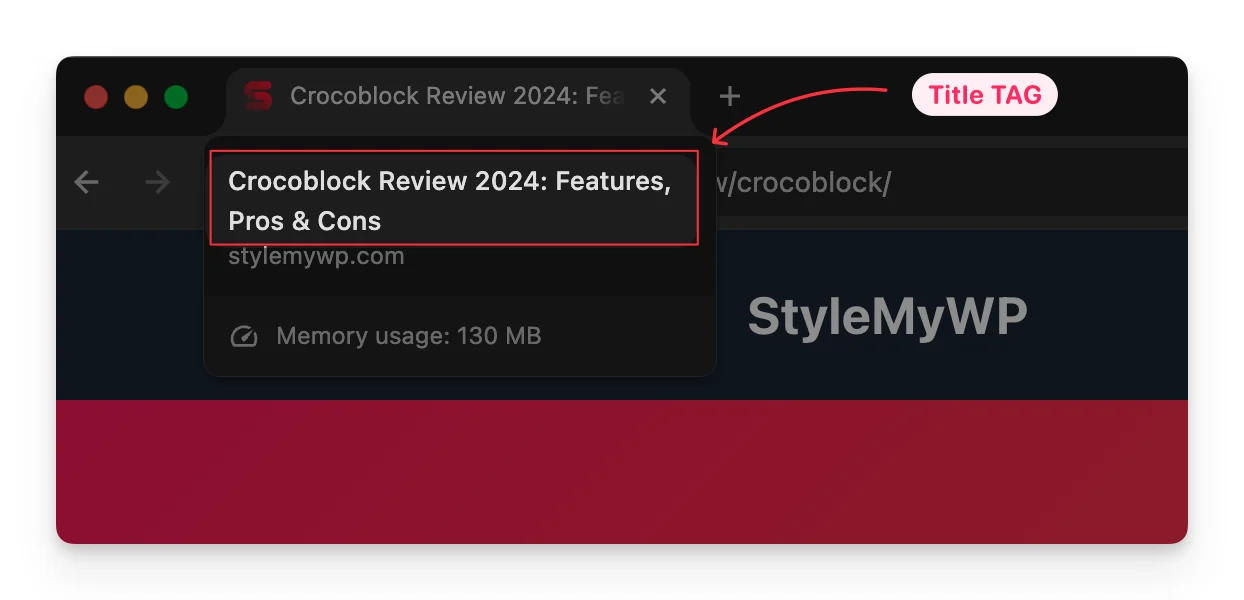
The title tag is the HTML element browsers show in the tab and search engines read first. Your on-page H1 can be longer and friendlier; the title tag has a budget of roughly 50 to 60 characters before it gets truncated in results. Put the query near the front, then give a reason to click that the other nine results are not giving.
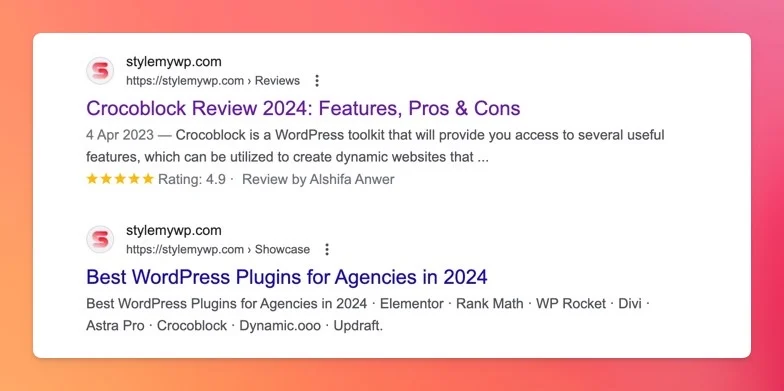
Meta description next. It is not a ranking factor and Google frequently ignores it, but when it is used it is your ad copy, so write it as one. Around 150 characters, states what the reader gets, no keyword stuffing.
3. Fix the slug before you publish, not after
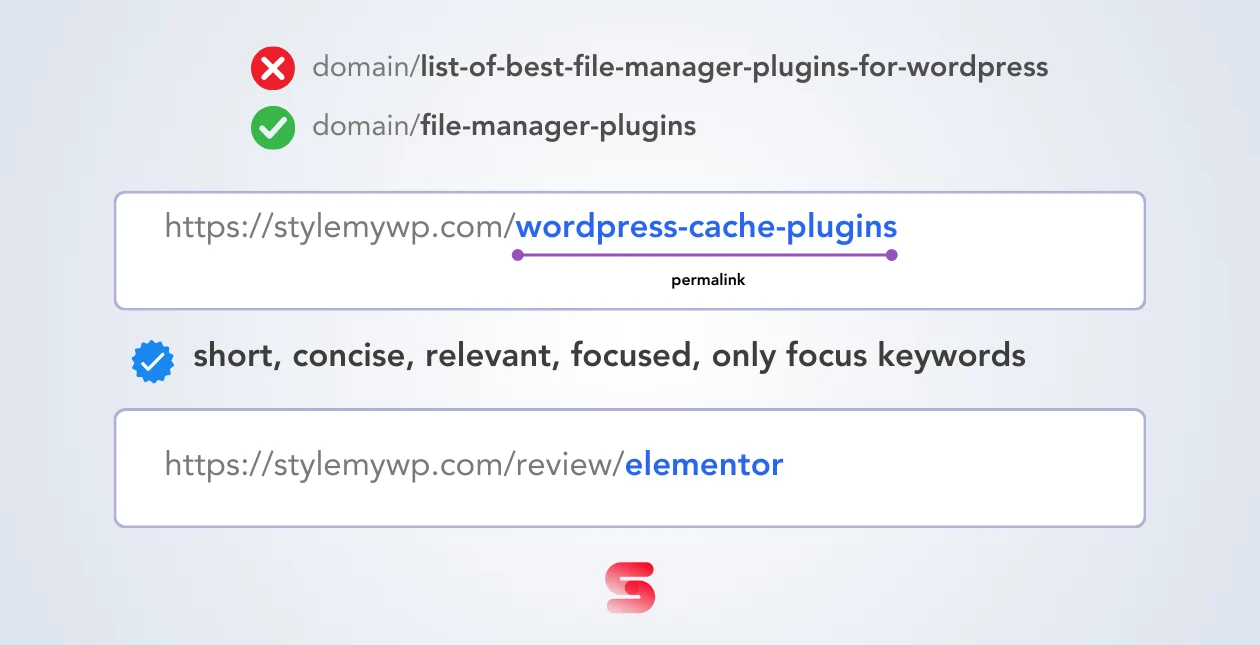
WordPress will happily generate /how-to-seo-optimize-your-wordpress-blog-posts-in-2026-a-complete-guide/ from your headline. Trim it to the two or three words that identify the page. Short, lowercase, hyphens, no stop words, no date.
The catch on old posts: changing a live slug breaks every existing link and any rankings attached to it. If you do change one, put a 301 in place the same minute using one of the WordPress redirect plugins, or the redirect manager built into your SEO plugin. A slug that is merely mediocre is not worth the risk on a post that already ranks.
4. Structure with headings a stranger could skim
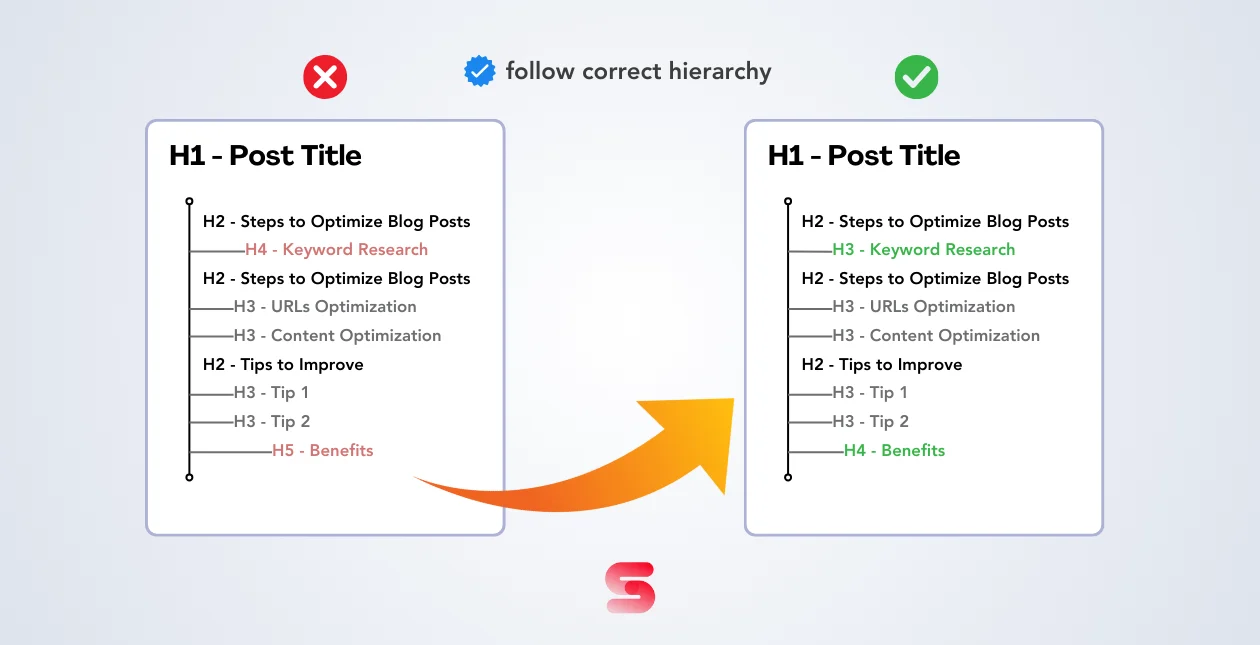
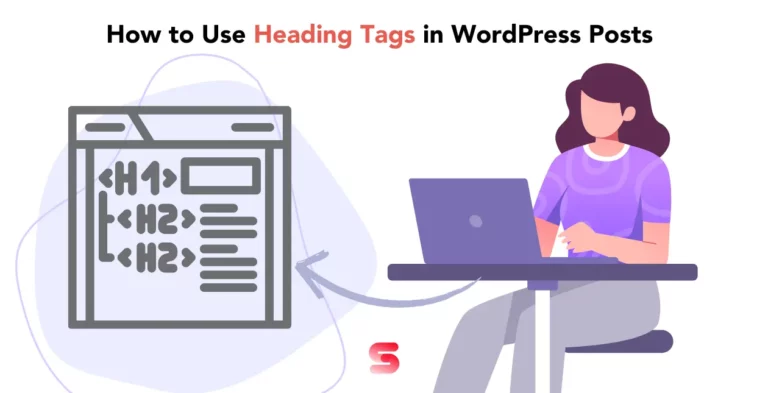
One H1, which WordPress already renders from your post title. Sections as H2, subsections as H3, and no skipping a level to get a font size you like. The diagram above is the whole rule: an H2 followed by an H4 is a broken outline, and screen readers announce that mess to real people.
Write headings as answers rather than labels. “How much does Rank Math PRO cost” earns its place; “Pricing” does not. Our guide to using heading tags in WordPress goes deeper on the hierarchy rules. Once your headings are clean, a table of contents becomes almost free, and most Gutenberg block plugins ship one that builds itself from your H2s.
5. Write the body for the reader, then check it for the robot
Answer the query in the first hundred words. Not after a warm-up paragraph about how important search engines have become, which everybody scrolls past anyway. Short paragraphs, concrete examples, real numbers where you have them.
Use the primary query in the opening, in at least one H2, and wherever else it lands naturally. That is the entire keyword placement rule. Related terms matter more than repetition: a post about optimizing blog posts that never mentions slugs, title tags, or internal links looks thin to a search engine regardless of how many times it says the target phrase.
6. Compress the images and write the alt text properly
Alt text describes the image to someone who cannot see it. That is the job. “How To SEO Optimize Blog Posts In WordPress” is a filename pretending to be alt text; “permalink comparison showing a long slug marked wrong beside a short keyword-focused slug” is alt text. Decorative images get an empty alt attribute, not a keyword.
Then deal with the file weight. A 900KB hero image is the single most common reason a well-written post feels slow on mobile. Serve WebP, size the file to the width it actually displays at, and let one of the image optimization plugins handle the conversion in bulk so you are not doing it by hand forever.
7. Link it into your site, then publish and measure
A new post with no internal links pointing at it is an orphan, and orphans get crawled late and ranked poorly. Link out from the new post to three or four genuinely related posts using descriptive anchor text, then go back into two or three older posts and link forward to the new one. That second half is the bit everyone forgets, and it is where most of the value is.
Then leave it alone for a few weeks. Search Console will show you impressions before it shows you clicks, and a post sitting at position 12 with impressions is a title-tag problem, not a content problem. If you are tracking more than a handful of queries, one of the keyword rank tracking tools saves you a lot of manual checking, and both Rank Math PRO and SEOPress Insights bundle tracking into the dashboard.
The catch most guides leave out
Three uncomfortable things about on-page SEO that plugin marketing does not advertise.
Google rewrites your titles. Its documentation states that if it detects an issue with your title, it “may try to generate an improved title link from anchors, on-page text, or other sources”, drawing on H1s, og:title, anchor text and more. Snippets work the same way: they are primarily built from page content, and your meta description is used only when Google thinks it describes the page better. Write both well, then accept you do not have the final say. Google’s title link documentation spells it out.
A green light is not a ranking. The score in your SEO plugin measures whether you followed that plugin’s checklist. It has no knowledge of your competitors, your backlinks or your topical authority. A post can score 100/100 and never crack page three. Treat it as a spellcheck for structure, then close the sidebar.
Your theme and hosting cap the result. No plugin setting fixes a theme that loads five webfonts and a slider on every post. If Core Web Vitals are failing, the fix is upstream: a lighter build, sane caching, better hosting. Start with our guide to speeding up a WordPress website, add a proper cache layer from the WordPress cache plugins roundup, and if you are rebuilding anyway, pick from the SEO-optimized themes rather than fighting a bloated one for years.
Which plugin should you actually pick?
- New blog, no budget: Rank Math free. Do the seven steps. Revisit in six months when you have data worth tracking.
- One site, want predictable bills: SEOPress PRO at $49/year that renews at $49/year.
- Several sites you own: Rank Math PRO, since one licence covers unlimited personal sites.
- Client work: SEOPress PRO for the white label, or Rank Math Business if you need client sites on one account.
- Team that needs support and training: Yoast Premium, and treat the Academy access as part of what you are buying.
Frequently Asked Questions
How long should it take to SEO optimize a blog post?
About twenty minutes for a post you have already written. Query research and the outline take longer, but the on-page work itself is title tag, meta description, slug, headings, image alt text and internal links. If it is taking an hour, you are optimizing things that do not move rankings.
Do I need a paid SEO plugin to optimize blog posts?
No. Every step in this workflow is possible on the free tier of Rank Math, Yoast or SEOPress. Paid licences mostly add rank tracking, advanced schema, redirect management and support. Buy one when a specific limitation blocks you, not before.
Is Rank Math better than Yoast SEO?
For most bloggers Rank Math is the better value, at €7.99/month billed annually against Yoast Premium’s $118.80/year, and its PRO plan covers unlimited personal sites rather than one. Yoast has the larger documentation library and paid support. Both do the on-page basics equally well.
Why does Google show a different title than the one I wrote?
Because Google rewrites title links when it thinks yours is a poor match. Its documentation says it may generate an improved title from your H1, anchor text, og:title or other on-page content. Write a clear, accurate title tag and it is used more often, but you never get a guarantee.
Should I change the URL slug of an old post?
Usually not. Changing a live slug breaks existing links and can cost you rankings the post already has. Only change it if the current slug is genuinely misleading, and set up a 301 redirect from the old URL in the same session. A slightly long slug is not worth the risk.
How many keywords should one blog post target?
One primary query per post, plus whatever related terms appear naturally. Targeting five unrelated queries in a single article usually means you rank for none of them. If two queries need genuinely different answers, write two posts and link them to each other.
Does a 100/100 score in my SEO plugin mean I will rank?
No. That score measures compliance with the plugin’s own checklist and knows nothing about your competitors, backlinks or site authority. A perfect score on a thin post still loses to a mediocre score on a genuinely better one. Use it as a structural spellcheck.
How often should I update old blog posts?
Review anything with slipping impressions in Search Console roughly every six months. Update the parts that went stale, prices and screenshots especially, and add internal links from newer posts. Republishing with no real changes does nothing except reset the date.
Our call
Stay free if your site is under a year old. Rank Math free, Yoast free or SEOPress free all cover the seven steps above, and the workflow is doing the work, not the licence.
Buy Rank Math PRO if you own more than one site and want rank tracking in the dashboard. The renewal only rises by about a euro a month, and one licence covers every personal site you own.
Choose SEOPress PRO instead if you build for clients. White label, no upsell notices, and $49 a year that stays $49 a year.
Our pick: Rank Math free while you learn the workflow, SEOPress PRO the day you start invoicing someone else for it. And whatever you install, go back and add the internal links. That is the step with the best return and the one everybody skips.


[…] analysis is still the best-explained of the bunch and it is genuinely useful if you are learning how to SEO optimise blog posts in WordPress, but treat the green light as a writing prompt rather than a target. Chasing a green bullet has […]
[…] And when the fix genuinely is editorial, it is usually structural rather than a rewrite: sharpen the intent match, tidy the heading tag hierarchy, and work through the rest of our checklist for optimising blog posts in WordPress. […]
[…] something better than what already ranks, getting your heading tags in a sensible order, actually optimising the post in WordPress, and making the page fast enough that people stay on it is the expensive part. If you have never […]
[…] Depth is where people overthink it. Two levels is enough for a standard blog post. You need H4 when you have genuinely nested detail, like a numbered install process sitting inside a broader “how to configure it” section. If you find yourself at H5, the section probably wants to be its own post. That’s also the moment to think about internal linking rather than more nesting, which is covered in our guide to optimising blog posts in WordPress. […]
[…] Worth knowing before you spend a weekend on this: Google’s own page experience guidance says Core Web Vitals are used by its ranking systems, and in the same breath says “There is no single signal” and that relevant content wins even when the experience is sub-par. Speed rarely lifts a page on its own. It stops speed being the reason you lose one. If ranking is the actual goal, pair this with on-page SEO for your posts. […]
[…] Whichever you land on, keep an eye on what the tool loads on the front end. Registration costs nothing measurable; a dynamic toolkit shipping widget CSS and query assets on every request is a different conversation, and one worth having when you look at site speed. The same goes for archives: set has_archive deliberately and make sure the pages you expose are ones you actually want indexed when you optimise content for search. […]
[…] rankings. On that tier there is nothing for a search engine to find, and no amount of work on optimising your blog posts changes […]
[…] who did everything the guides said. If you are at the beginning, the work that pays best is still optimizing your posts for search and publishing more of the ones that already rank. A capable SEO plugin such as Rank Math handles […]
[…] rather than decorating, and a closing line that tells the reader what to do next. Our guide to optimising blog posts in WordPress covers the on-page […]
[…] so a normal 200 response is correct. Give it a real title and description, the way you would SEO-optimise any other post, and it can start earning impressions before […]