


Rank Math gives away features that Yoast charges for, which is exactly why people are suspicious of it. It runs on StyleMyWP itself — the free version, on WordPress 7.1 with Blocksy and Elementor Pro. This review covers what the free version genuinely handles, where PRO earns its money, and what the plugin actually weighs once it has been sitting in a database for years.
Quick verdict
- Best for: bloggers and freelancers who want serious SEO control without paying for it, and agencies that need one licence across client sites.
- Skip it if: you only need titles and meta descriptions, or you want a small single-purpose plugin rather than one that owns your sitemaps, schema, redirects and analytics.
- Price: the free version is genuinely usable. PRO is €7.99/month billed annually for unlimited personal sites — and it renews at the same rate, which is rarer than it sounds.
- Our call: stay free until you are checking keyword positions weekly. At that point PRO is the cheapest rank tracker in WordPress.
Some links here are affiliate links. If you buy through them we may earn a commission at no extra cost to you — it never changes which plugin we recommend. Pricing checked August 2026. Rank Math displays local currency, so verify the figure at checkout.
What Rank Math actually is
Rank Math is an SEO plugin for WordPress. It writes your titles and meta descriptions, builds your sitemaps, generates schema markup, manages redirects, and pulls Search Console data into the WordPress admin. It has passed 4 million active installations with roughly 7,500 ratings on WordPress.org, which puts it second to Yoast on install base and first on rating.
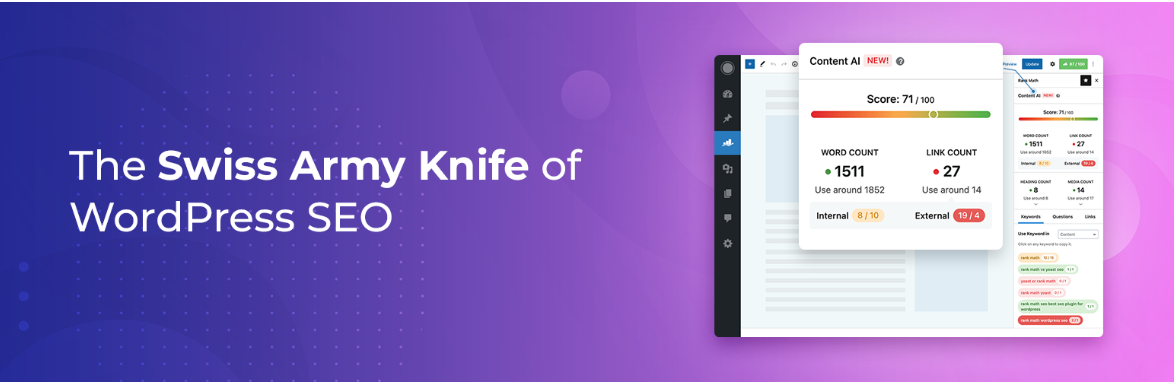
The thing to understand before comparing feature lists: Rank Math’s free tier was built as a competitive weapon. Schema types, redirections, a 404 monitor and Search Console integration all sit in the free plugin, and most competitors charge for at least two of those. That is good for you, and it is why the free-versus-PRO decision here is genuinely difficult — unlike Yoast, where the free version is deliberately incomplete.
| Type | WordPress SEO plugin |
| Active installs | 4 million+ (WordPress.org, August 2026) |
| Free version | Yes — the most complete free SEO plugin in WordPress |
| Entry paid plan | PRO — €7.99/month billed annually, unlimited personal sites |
| Best feature | Schema generator and Search Console data inside the admin |
| Worst habit | The Analytics module stores search history in your database and grows |
| Our rating | 4.6 / 5 |
Rank Math free vs PRO: what you actually get
This is the only question most readers came for, so here it is before the feature tour. The free version handles everything a normal blog needs to rank. PRO is a data and automation upgrade, not a “now your SEO works” upgrade.
| Capability | Free | PRO |
|---|---|---|
| On-page analysis (30+ tests), setup wizard, auto canonicals | Yes | Yes |
| XML sitemaps, Search Console integration | Yes | Yes |
| Schema markup | 18 pre-defined types | 840+ types |
| Redirections | Yes, basic | Yes, advanced with regex |
| 404 monitor | Simple | Advanced |
| Keyword rank tracking | — | 500 keywords (10,000 on Business) |
| Analytics with daily updates | — | Yes |
| Video and news sitemaps | — | Yes |
| WooCommerce SEO PRO, Local SEO PRO, Image SEO automation | — | Yes |
| White-labelled client reports | — | Yes |
| Content AI | Trial credits only | Trial credits, then a separate subscription |
| Support | Standard | 24/7 priority |
The honest upgrade trigger: ignore the feature list and ask one question — do you look at keyword positions more than once a week? If yes, PRO’s rank tracker replaces a far more expensive standalone tool. If no, the free version is not holding you back, and nothing in PRO will move your rankings by itself.
Rank Math pricing in 2026 (and what it renews at)
| Plan | Price (billed annually) | Sites | Tracked keywords | Best for |
|---|---|---|---|---|
| Free | €0 | Unlimited | — | Most single blogs |
| PRO | €7.99/mo (≈ €95.88/yr) | Unlimited personal | 500 | Bloggers and freelancers tracking rankings |
| Business | €24.99/mo (≈ €299.88/yr) | 100 client sites | 10,000 | Agencies with client reporting |
| Agency | €54.99/mo (≈ €659.88/yr) | 500 client sites | 50,000 | Large agencies |
| Rank Math + WP Rocket bundle | €11.99/mo (≈ €143.88/yr) | Unlimited personal, WP Rocket on 1 | 500 | Anyone about to buy both |
Two things worth naming, because most reviews skip both. First, Rank Math does not run the deep first-year discount its rivals do — the price you see is broadly the price you keep, which is not true across this market. Second, Content AI is a separate meter. Paid plans include trial credits, but sustained use is its own subscription: one generated word costs one credit, a content research request costs 500 credits per document, and unused credits do not roll over. Budget for it separately, or ignore the feature — do not assume PRO buys it.
If you are weighing the bundle, our WP Rocket review covers whether that half of it is worth having, and our WordPress cache plugin roundup lists the free alternatives if it is not.
Setup: two minutes, then five settings we always change
Install it from Plugins → Add New, activate, and the setup wizard walks you through connecting a free Rank Math account, choosing Easy or Advanced mode, and linking Search Console. It is the fastest onboarding in the category, and it is also where most people accept defaults they should not.

- Choose Advanced mode. Easy mode hides the redirection and schema modules — the two things that make Rank Math worth installing.
- Turn off the modules you will not use. Every module is individually switchable under Rank Math → Dashboard, and each one you leave on adds admin queries. Ours runs with 18 modules enabled and it is more than we need.
- Set Analytics retention low. The default is generous; 90 days is plenty for a blog. This is the single setting that keeps your database sane — see the costs section below.
- Noindex your thin archives. Tag and author archives on a one-author blog are duplicate content by another name.
- Set a default schema type per post type. Article for posts, Software Application or Product for reviews. Doing it once beats doing it per post forever.
Once it is configured, the per-post workflow is what you actually live with: a focus keyword field, a live score out of 100, and a checklist.
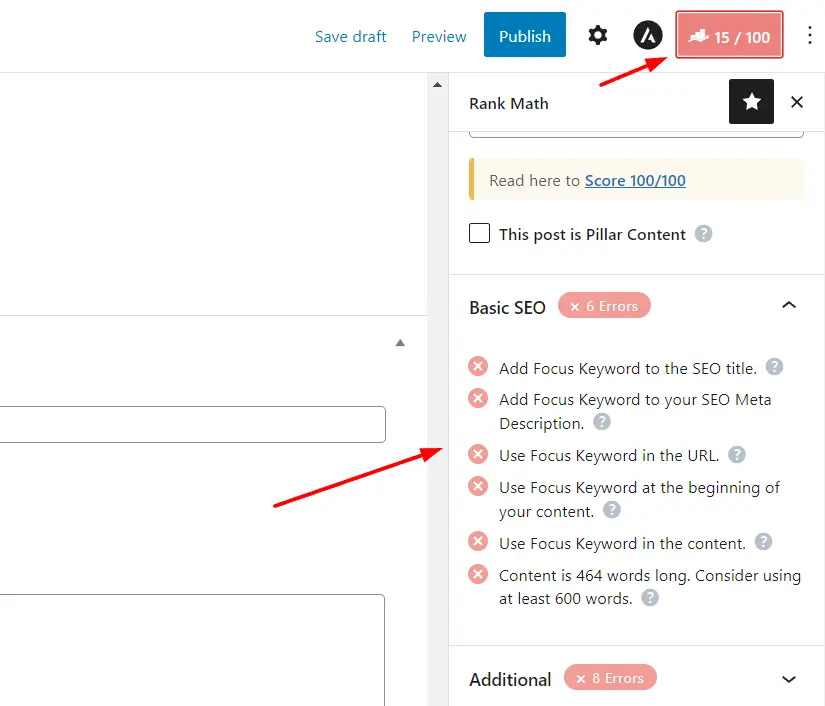
Do not chase the green score. The 100-point analysis is a checklist, not a ranking model. Posts scoring 71 outrank posts scoring 100 every day. Use it to catch the mechanical misses — missing alt text, no internal links, the keyword absent from the first paragraph — then stop. If you want the full workflow, we wrote it up in how to SEO optimise blog posts in WordPress, and the heading half of that score is covered in how to use heading tags in WordPress.
The five features that actually matter
Rank Math has more modules than any review can usefully list, and listing them all is what every other review does. These five are the ones that change how you work.
1. The schema generator (included free)
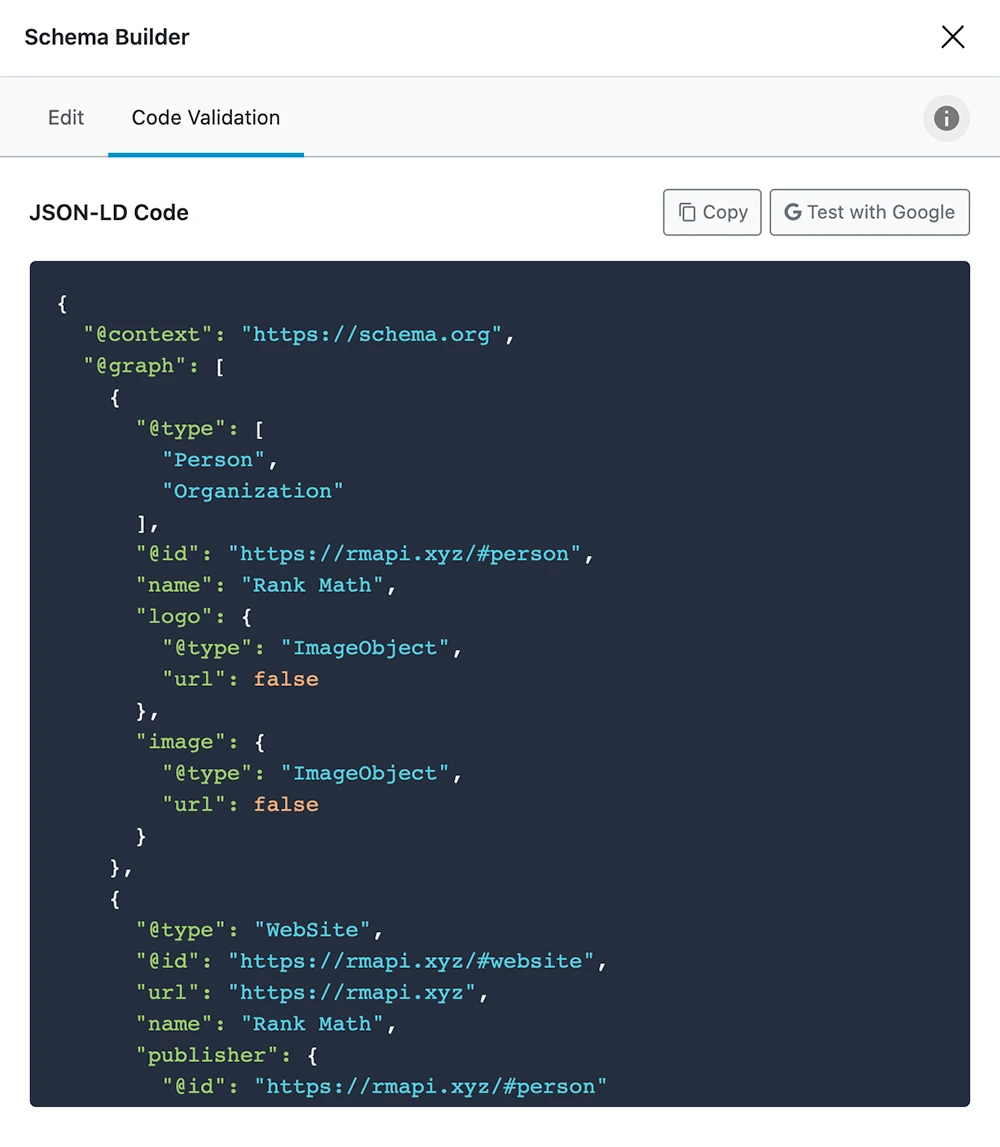
Rich results are the most visible SEO win available to a small site, and Rank Math is the cheapest route to them. The free version ships 18 pre-defined schema types with a visual builder and markup validation; PRO opens the full library and custom templates you can attach to an entire post type. Best for: recipe, review, FAQ, how-to and local sites. Skip it if: your theme already outputs schema — two sources of structured data on one page is a bug, not a bonus.
2. Search Console and analytics inside WordPress
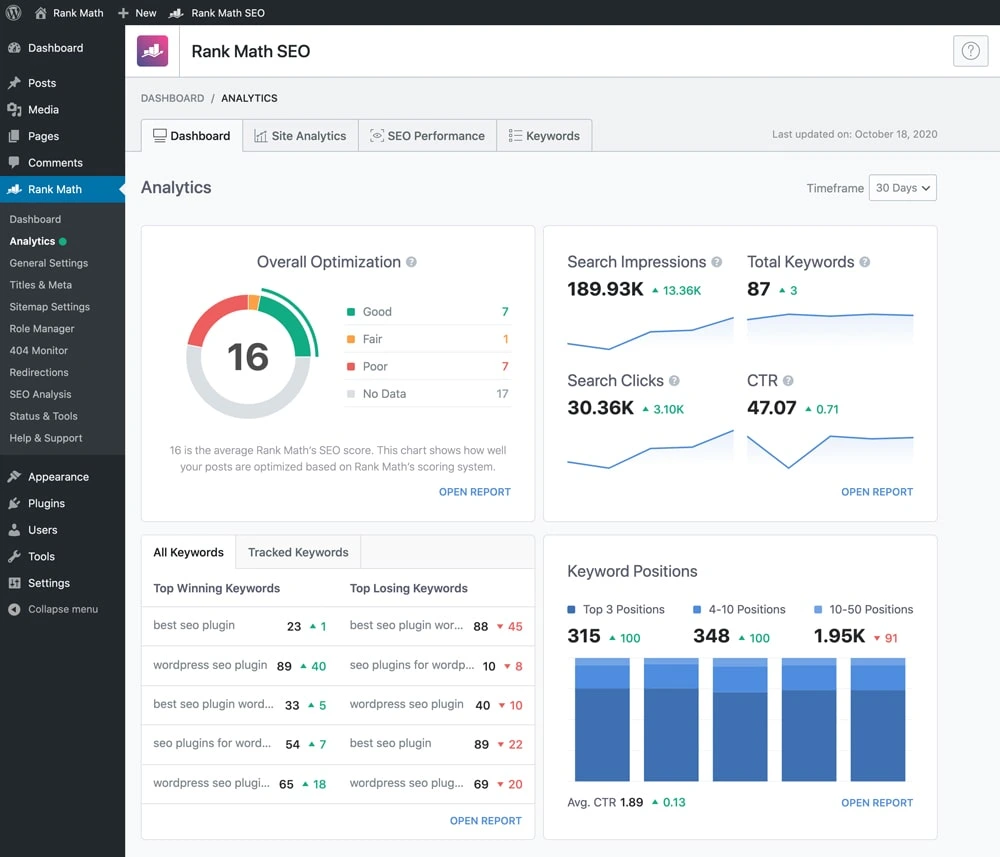
Clicks, impressions, positions and index status, per post, in the same screen where you edit the post. It is genuinely useful and it is also the heaviest thing in the plugin — see the costs section below. Best for: people who will act on the data weekly. Skip it if: you will open it twice a year; Search Console is free and lives outside your database.
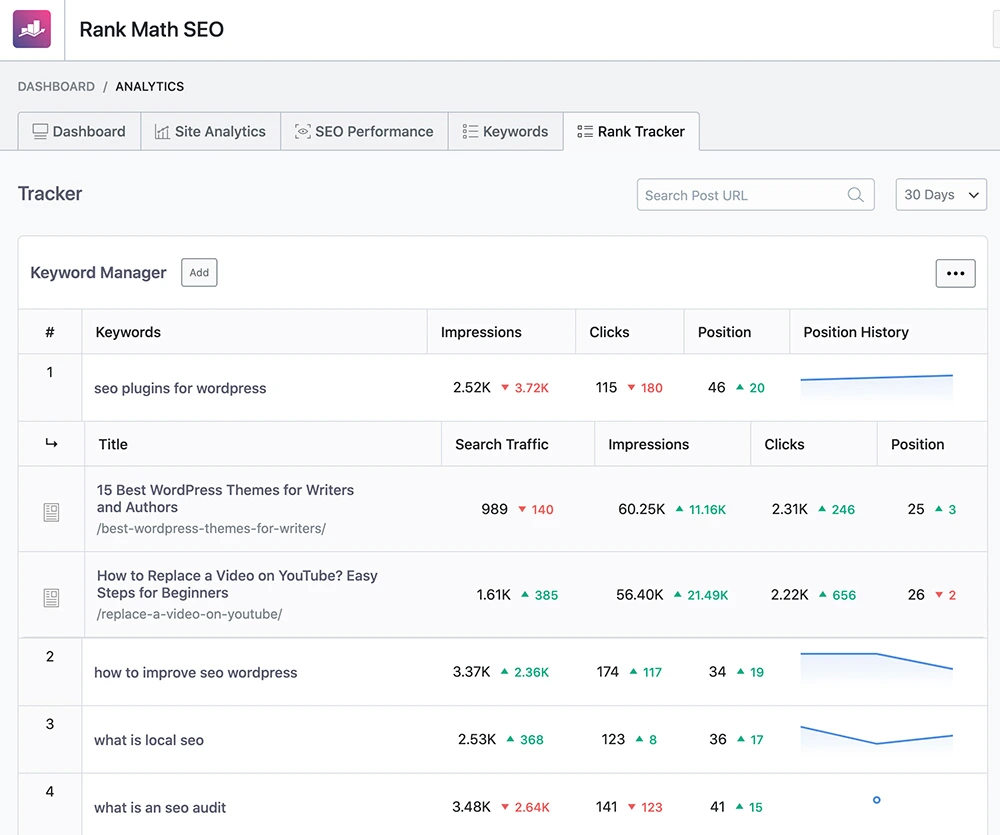
3. Rank tracker (PRO)
500 tracked keywords on PRO with position history, and 10,000 on Business. This is the feature that makes the upgrade arithmetic work: standalone rank trackers cost several times more for a fraction of that keyword count. Compare it against the dedicated options in our keyword rank tracking tools roundup before you cancel anything — the standalone tools give you competitor tracking that Rank Math does not.
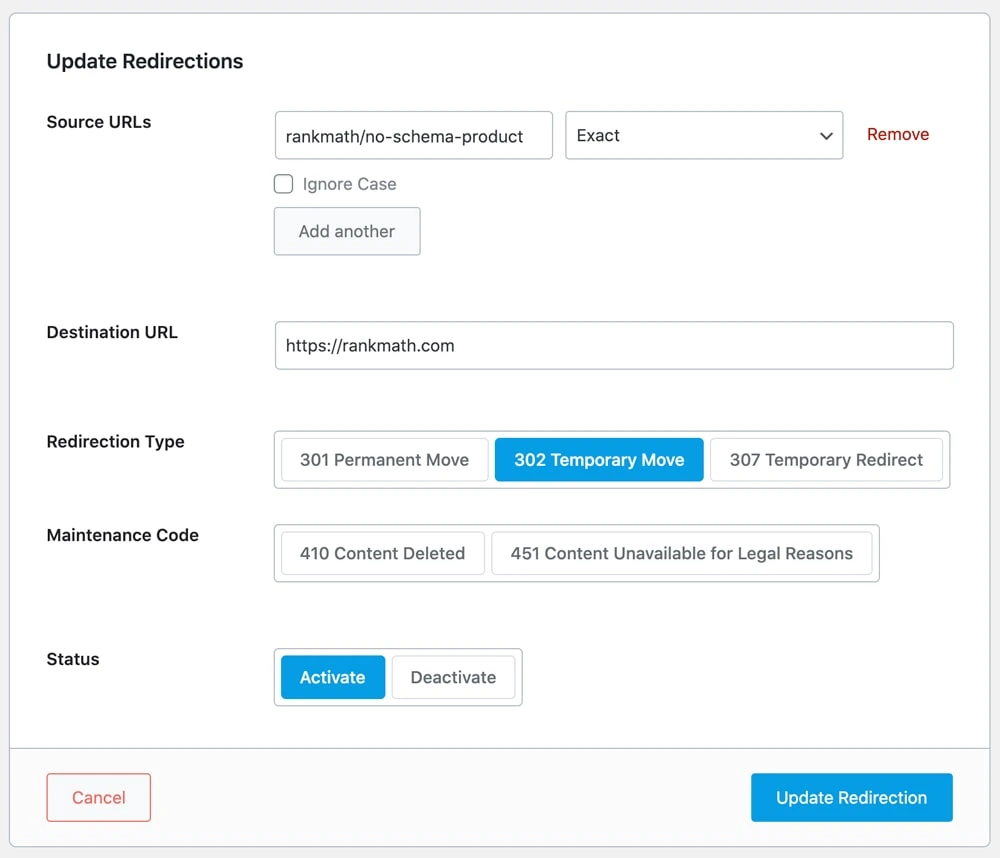
4. Redirections and the 404 monitor
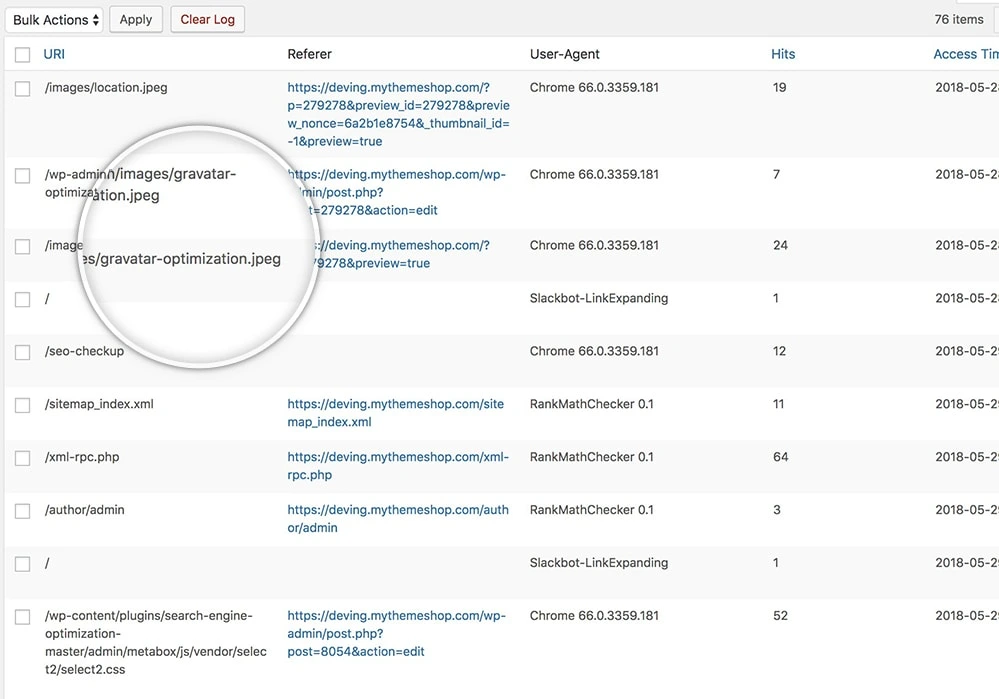
Both are in the free version, which is unusual — most plugins gate redirects behind a licence. You get 301, 302, 307, 410 and 451 redirects, and PRO adds regex and bulk handling. It is enough to retire a standalone redirect plugin on most sites, which is one fewer plugin to keep updated; our WordPress redirect plugins roundup covers when a dedicated tool is still the better call. The catch: the 404 log grows for as long as you leave it running.
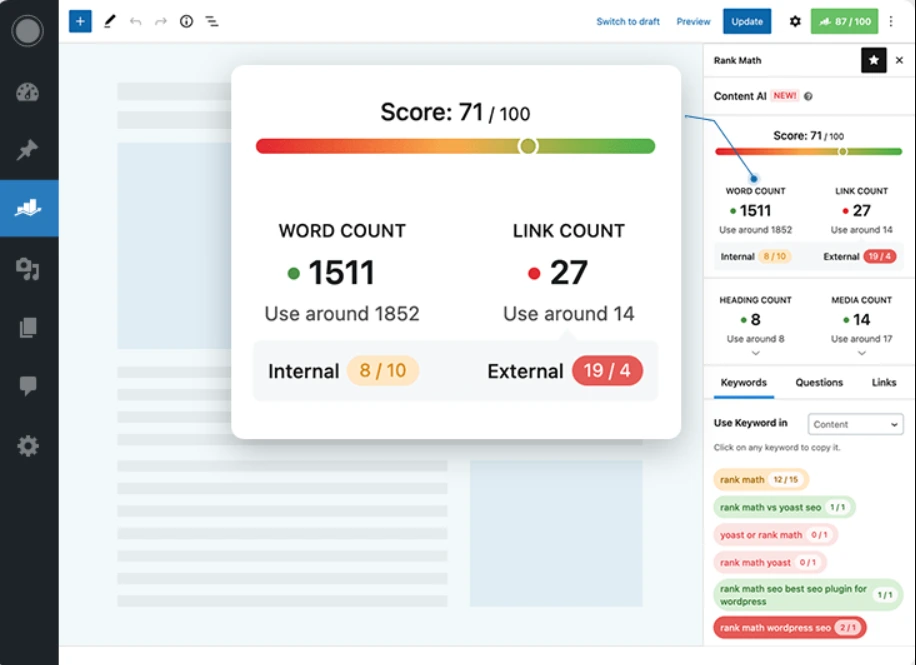
5. Content AI (metered separately)
Keyword research, content briefs and generative writing tools inside the editor. The research output — related keywords, questions, suggested word count and link targets — is the part worth having; the generated prose still needs rewriting before it sounds like a person. Because it runs on credits that do not roll over, treat it as a research subscription rather than a writing shortcut, and compare it with the dedicated options in our keyword research tools guide.
What Rank Math costs you beyond the licence
This is the section most Rank Math reviews will not write, and it is why our performance score is a 4 rather than a 5. We measured it on this install rather than repeating forum folklore.
What the plugin weighs here. On StyleMyWP, Rank Math’s eight database tables total 0.34 MB inside a 169.84 MB database — the internal-links table is the largest at 96 KB across 360 rows, and the 404 log holds 92 entries. In other words, the plugin’s own structural footprint is nothing. But that number comes with an honest caveat: our Search Console history table is empty, because we read that data in Google’s own tools rather than through Rank Math. The weight is not in the plugin — it is in the history the Analytics module stores once you switch it on.
And that history is not small. Rank Math’s own documentation notes that the analytics database is expected to exceed 100 MB on a content-heavy site, and users on the support forums report several hundred megabytes. On a cheap shared host with a database size cap, that matters. The fix is a setting, not a plugin change: lower the analytics retention period, clear the 404 log once you have fixed the broken URLs, and purge completed Action Scheduler tasks. If you will not do that maintenance, turn the module off and read your data in Search Console — which is exactly what we do.
Front-end impact is small; admin impact is not. Rank Math adds very little to what your visitors download — it outputs meta tags and a few kilobytes of schema JSON, not scripts. The weight lands in wp-admin, where dashboard widgets and analytics queries make editor screens noticeably slower on cheap hosting. If your admin already crawls, our WordPress speed optimisation guide and guide to reducing server response time will do more for you than switching SEO plugins.
The catch
Rank Math’s strength — it does everything — is also the fair criticism of it. You are installing a plugin that wants to own your sitemaps, your schema, your redirects, your analytics and your AI writing. That is convenient right up until you want to leave, and it means one bad release can take out five parts of your site at once. Site owners who prefer small single-purpose plugins are not wrong, and if all you need is titles and meta descriptions, this is more machinery than the job requires.
The second catch is quieter: the free tier is a funnel. It is a genuinely good deal today, and it is also a commercial strategy — Content AI is metered, and the most useful data features sit behind PRO. Nothing dishonest about that, but plan for the possibility that the free tier thins over time, and keep your content portable.
Rank Math vs Yoast vs AIOSEO
| Rank Math | Yoast SEO | AIOSEO | |
|---|---|---|---|
| Entry paid price | €7.99/mo billed annually | $118.80/year ex VAT | €49.50 first year (Basic) |
| Sites covered | Unlimited personal | 1 site per licence | 1 site (Basic) |
| Renewal | Same rate | Same rate | Full price — €99 on Basic |
| Free version | Most complete in the category | Deliberately limited | Limited |
| Redirects in free | Yes | No (Premium) | No (paid) |
| Rank tracking | Yes — 500 keywords on PRO | No | Yes, higher tiers |
| Best at | Feature depth per euro | Readability, stability, support | WooCommerce and local SEO |

Our read: on price per feature, Rank Math wins and it is not close — one PRO licence covers every personal site you own, where Yoast Premium is $118.80 a year per site. Yoast’s counter-argument is not features, it is steadiness: a smaller surface area, a slower release cadence, and readability analysis that non-writers genuinely benefit from. AIOSEO sits in between and is worth a look for WooCommerce-heavy stores — but note its headline prices are 50% first-year introductory rates, so the renewal is double what the pricing page shows.
If you want the wider field rather than three names, see our roundup of the best WordPress SEO plugins — and if you are still choosing a theme, SEO-optimised WordPress themes will matter more for your Core Web Vitals than either plugin does.
Switching from Yoast without losing rankings
Rank Math’s setup wizard offers to import your existing SEO data, and it works — titles, descriptions, focus keywords, canonicals, noindex flags and redirects all come across. Three rules make it safe:
- Back up first, database included. Our WordPress backup plugins roundup covers the free options that will do this in two clicks.
- Import, verify, then deactivate. Spot-check ten posts — including one with a custom canonical and one you deliberately noindexed — before the old plugin comes off.
- Resubmit your sitemap in Search Console afterwards and watch the index coverage report for a fortnight.
Switching SEO plugins does not, by itself, move rankings in either direction. What moves rankings is a botched import that quietly drops your canonicals — which is why the verification step is not optional.
Who should use what
- New blog, under 50 posts: the free version. Leave Analytics off. Revisit in a year.
- Established blog tracking rankings weekly: PRO. The rank tracker alone replaces a more expensive standalone tool.
- Freelancer with several personal sites: PRO — one licence covers all of them, which is the single biggest saving in this comparison.
- Agency with client sites and reporting: Business, for the 100-site licence, 10,000 keywords and white-labelled reports.
- WooCommerce store: PRO for the WooCommerce SEO module, but audit AIOSEO too — its product schema handling is strong. Start with our WooCommerce plugins roundup.
- Very cheap shared hosting: the free version with Analytics and the 404 monitor switched off — or a lighter plugin entirely.
Frequently Asked Questions
Is the Rank Math free version enough?
For most blogs, yes. The free version includes on-page analysis, XML sitemaps, 18 schema types, redirections, a 404 monitor and Search Console integration — enough to rank a normal content site. PRO adds data and automation, mainly keyword rank tracking, not ranking ability you were missing.
Is Rank Math PRO worth it?
It becomes worth it when you check keyword positions weekly. PRO tracks 500 keywords for €7.99 per month billed annually across unlimited personal sites, which undercuts standalone rank trackers substantially. If you would not open the data, PRO will not move your rankings on its own.
Does Rank Math slow down your website?
Front-end impact is minimal — it outputs meta tags and schema, not scripts. The weight lands in wp-admin, where the Analytics module runs the heaviest queries and stores Search Console history in your database. Lowering the analytics retention period fixes most of it.
Why does Rank Math make my database so large?
The Analytics module stores Search Console history in its own tables, and Rank Math notes it can exceed 100 MB on content-heavy sites. The 404 log also keeps growing. On our install, with analytics history off, all eight Rank Math tables total 0.34 MB.
Rank Math vs Yoast — which should I use?
Rank Math gives more features per euro, and one PRO licence covers unlimited personal sites where Yoast Premium is $118.80 per year per site. Yoast counters with a smaller feature surface, a slower release cadence and better readability analysis. Feature-hungry owners pick Rank Math; cautious ones stay on Yoast.
Can I switch from Yoast to Rank Math without losing rankings?
Yes. Rank Math’s wizard imports titles, descriptions, focus keywords, canonicals, noindex settings and redirects. Back up your database first, spot-check ten posts after the import, then deactivate Yoast. Switching plugins does not move rankings — a botched import that drops canonicals does.
Is Content AI included in Rank Math PRO?
Not on an ongoing basis. Paid plans include trial credits, after which Content AI is a separate subscription. One generated word costs one credit and a research request costs 500 credits per document, and unused credits expire each month. Budget for it separately.
How many sites can I use one Rank Math licence on?
PRO covers unlimited personal websites — sites you own, not client sites. Business covers 100 client sites with 10,000 tracked keywords, and Agency covers 500 client sites with 50,000 keywords. For freelancers with several projects of their own, PRO is the value pick.
Final verdict
Rank Math is the SEO plugin we run on this site, and the one we reach for on new builds. It gives away more in its free tier than anything else in the category, its schema tooling is the cheapest route to rich results a small site has, and one PRO licence covering every personal site you own is a genuinely unusual deal in WordPress. It loses half a point on performance, because the Analytics module will grow your database if you never look at it, and half a point on value, because Content AI is a second bill dressed as a feature.
- Buy PRO if: you track keyword positions weekly, or you run several sites of your own.
- Stay free if: you are under 50 posts, or on hosting where an extra few hundred megabytes of database matters.
- Choose Yoast instead if: you want the smallest, steadiest option, and readability coaching more than features.
- Our pick for most readers: the free version now, PRO the month you start checking rankings on a schedule.
Rank Math (free version, 1.0.277.1) runs on stylemywp.com — WordPress 7.1 with Blocksy and Elementor Pro. Database figures measured on this install in August 2026. Pricing and feature limits checked August 2026 against Rank Math’s own pricing page and knowledge base. More tool verdicts in our reviews section.