


Custom field plugins all sell the same promise, extra structured data on your posts, and then differ on the two things that actually cost you money: what the free tier gives away, and what the licence costs in year two. There is also a fork in this category that older roundups predate, and it changed which plugin sits on a couple of million sites. Seven options below, prices re-checked against vendor pages in August 2026.
Quick verdict
- Best overall: Meta Box. The free core covers 40+ field types, $49 a year adds the drag-and-drop builder, and $99 covers every extension across three sites. Nothing else here gives you that much for that little.
- Best free: Secure Custom Fields. It is the WordPress.org fork of ACF, and it ships the repeater, flexible content, clone, gallery, options pages and blocks that ACF still sells as PRO features.
- Best for dynamic front ends: JetEngine, if you are already building in Elementor, Gutenberg or Bricks. Custom fields are maybe a third of what it does.
- Skip the whole category if: you need three text fields on one post type. A ten-line snippet in your child theme does that without a licence renewal attached.
- Our call: start on Secure Custom Fields, because it costs nothing and the PRO field types are already in it. Move to Meta Box when you want custom tables and a support inbox. Buy ACF PRO when the client already runs it and everyone on the team knows it.
The best WordPress custom field plugins in 2026
| Plugin | Free version | Paid entry | Renewal | Unlimited sites |
|---|---|---|---|---|
| Secure Custom Fields | Yes, everything | No paid tier | n/a | n/a |
| Advanced Custom Fields | Yes, limited | $49/yr, 1 site | $49/yr, auto-renew | $249/yr, unlimited |
| Meta Box | Yes, code only | $49/yr, 1 site | Regular price | $149/yr, unlimited |
| Pods | Yes, everything | No paid tier | n/a | n/a |
| JetEngine | No | $75/yr, 1 project | No discount stated | $169/yr, unlimited |
| Toolset | No | €69 first year, 1 site | €51/yr | €299 first year, unlimited |
| CMB2 | Yes, everything | No paid tier | n/a | n/a |
Two arithmetic notes on that table, because the marketing pages will not make them for you. Among the dollar-priced plugins, ACF PRO and Meta Box tie for the cheapest paid entry at $49 a year for one site. Among the dollar-priced plugins again, the cheapest unlimited-site licence is Meta Box at $149 a year, ahead of JetEngine at $169, Meta Box’s own Agency Ultimate bundle at $229 and ACF Agency at $249.
Some links below are affiliate links. If you buy through them we may earn a commission, at no extra cost to you. It does not change which plugin we tell you to buy.
The ACF fork, in plain English
On 12 October 2024 the WordPress.org security team took over the advanced-custom-fields listing in the plugin directory and pushed a fork through it named Secure Custom Fields. The official announcement said SCF “has been updated to remove commercial upsells and fix a security problem” and called it “a rare and unusual situation brought on by WP Engine’s legal attacks”. Every site with plugin auto-updates enabled changed custom field plugin overnight without an admin clicking anything.
In December 2024 a court granted WP Engine a preliminary injunction, and control of the ACF listing went back to WP Engine, as WP Tavern reported at the time. The fork kept its own home. So today there are two listings, not one: Advanced Custom Fields by WP Engine, with 2,000,000+ active installs, and Secure Custom Fields by WordPress.org, with 90,000+.
How to tell which one you have
Open Plugins in wp-admin and read the author column, not the folder name. “Advanced Custom Fields (ACF)” by WP Engine is the original. “Secure Custom Fields” by WordPress.org is the fork. Assume nothing from memory: the whole point of the October 2024 switch was that it happened without a prompt.
What the fork means for your data
Less than the drama suggests. Both plugins write field groups into wp_posts and field values into wp_postmeta in the same shape, and both expose get_field(), the_field() and have_rows(). Template code written against one runs against the other. They do deactivate each other on activation, because they declare the same function names, so you cannot run both. Take a database backup with one of the WordPress backup plugins before you swap either way, and do it on staging first.
Secure Custom Fields: the free one with the paid features
Secure Custom Fields is the WordPress.org-maintained fork of ACF, currently at version 6.9.5 with 90,000+ active installs and a 4.8 rating from 64 reviews on its plugin directory listing. The interesting part is what went into it. When the fork was built, the ACF PRO field types came along for the ride: repeater, flexible content, clone, gallery, options pages and blocks, with the licence and update checks stripped out, as WP Tavern documented in November 2024. The current SCF handbook still carries tutorials for the repeater field and for building an options page.
Read that again if you have been paying $49 a year for a repeater field. The same field type, from the same code lineage, is sitting in the plugin directory for nothing.
Key features
- Repeater, flexible content, clone and gallery fields, free
- Options pages for global header and footer data
- Register custom post types and taxonomies from the SCF interface
- 30+ field types, per the plugin directory listing
- Local JSON export for version-controlled field groups
- Maintained on WordPress.org, so it updates through the normal channel
Price: free. There is no paid tier and no upsell screen.
Best for: anyone who wants ACF’s field types without a licence, and anyone who was auto-switched in 2024 and has been running it happily ever since without knowing.
Skip it if: you need a vendor with a support contract, or you are building on somebody else’s ACF PRO add-on that checks for the commercial plugin. The install base is small, so third-party integrations name ACF far more often than they name SCF.
Advanced Custom Fields: the one everything else integrates with
ACF is the default in this category and has been for a decade. At 2,000,000+ active installs it is the most-installed plugin in this comparison by WordPress.org active installs, by a wide margin, and that matters more for the ecosystem than for the plugin: themes ship ACF field groups, page builders read ACF values, and most WordPress meta advice online assumes you are running it.
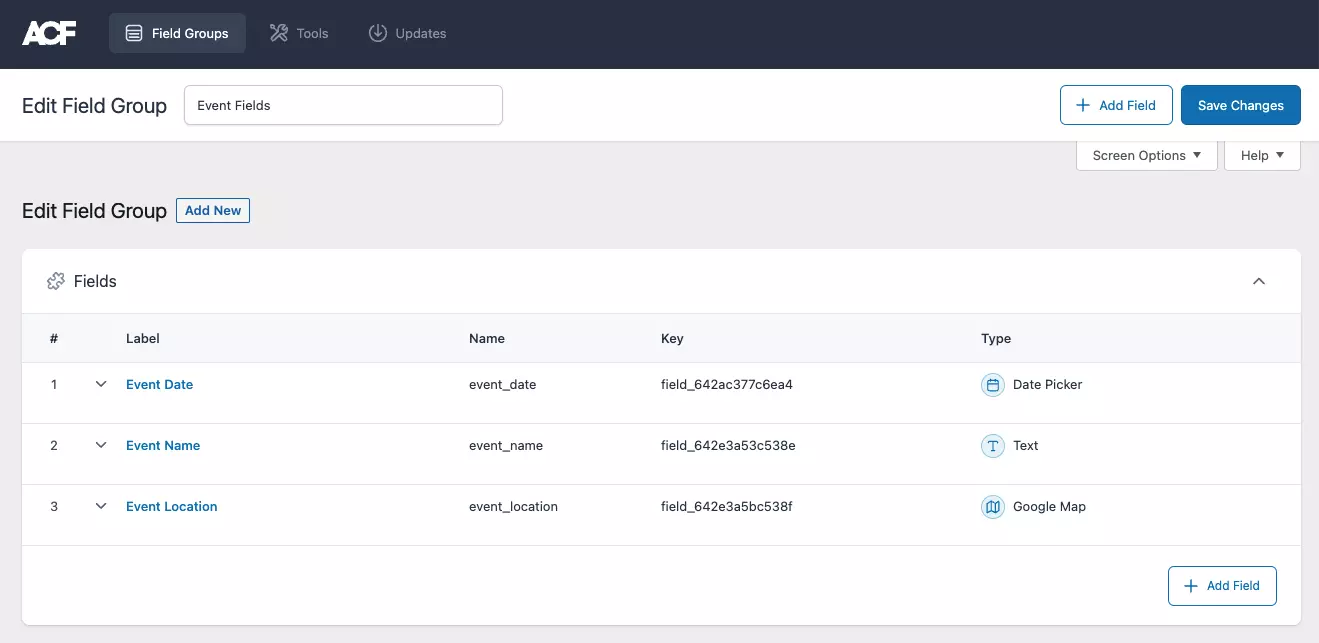
The free version handles text, image, date, select, relationship and the rest, and it registers post types and taxonomies from its own UI, so you may not need one of the dedicated custom post type plugins alongside it. Its .org rating sits at 4.5 from 1,438 reviews, the lowest of the five WordPress.org-listed plugins here, and worth reading as a proxy for how strongly people felt about 2024.
Key features
- Field UI that most WordPress developers already know
- Fields on posts, pages, users, terms, media, comments and options pages
- Post type and taxonomy registration built in
- Local JSON sync, plus import and export of field groups
- PRO adds repeater, flexible content, clone, gallery, options pages and ACF Blocks
- Accessibility standards reviewed and applied, per the plugin directory listing
Price: free core. ACF PRO is $49/yr for 1 site, $149/yr for 10 and $249/yr unlimited, in US dollars excluding tax. Licences auto-renew each year and the pricing page states no renewal discount, so budget the same figure again in year two.

Best for: agencies and freelancers handing sites to other developers. Picking ACF is the choice nobody has to explain to the next person who touches the site.
Skip it if: the only PRO feature you want is the repeater. Secure Custom Fields has it for free, and the two are close enough that your template code will not notice.
Once fields exist, the next question is displaying them conditionally. Our guide to hiding a widget when an ACF field is empty covers the pattern, and the dynamic visibility plugins roundup covers doing it without code.
Meta Box: the best value if you write a little PHP
Meta Box has 500,000+ active installs and a 4.8 rating from 165 reviews on its plugin directory listing. The free core ships 40+ field types and is a developer framework: you register fields in PHP, or you pair it with the free MB Custom Post Types plugin for a UI on post types. The drag-and-drop field builder lives in the paid bundles, which is the honest trade here. Pay nothing and write arrays, or pay and click.
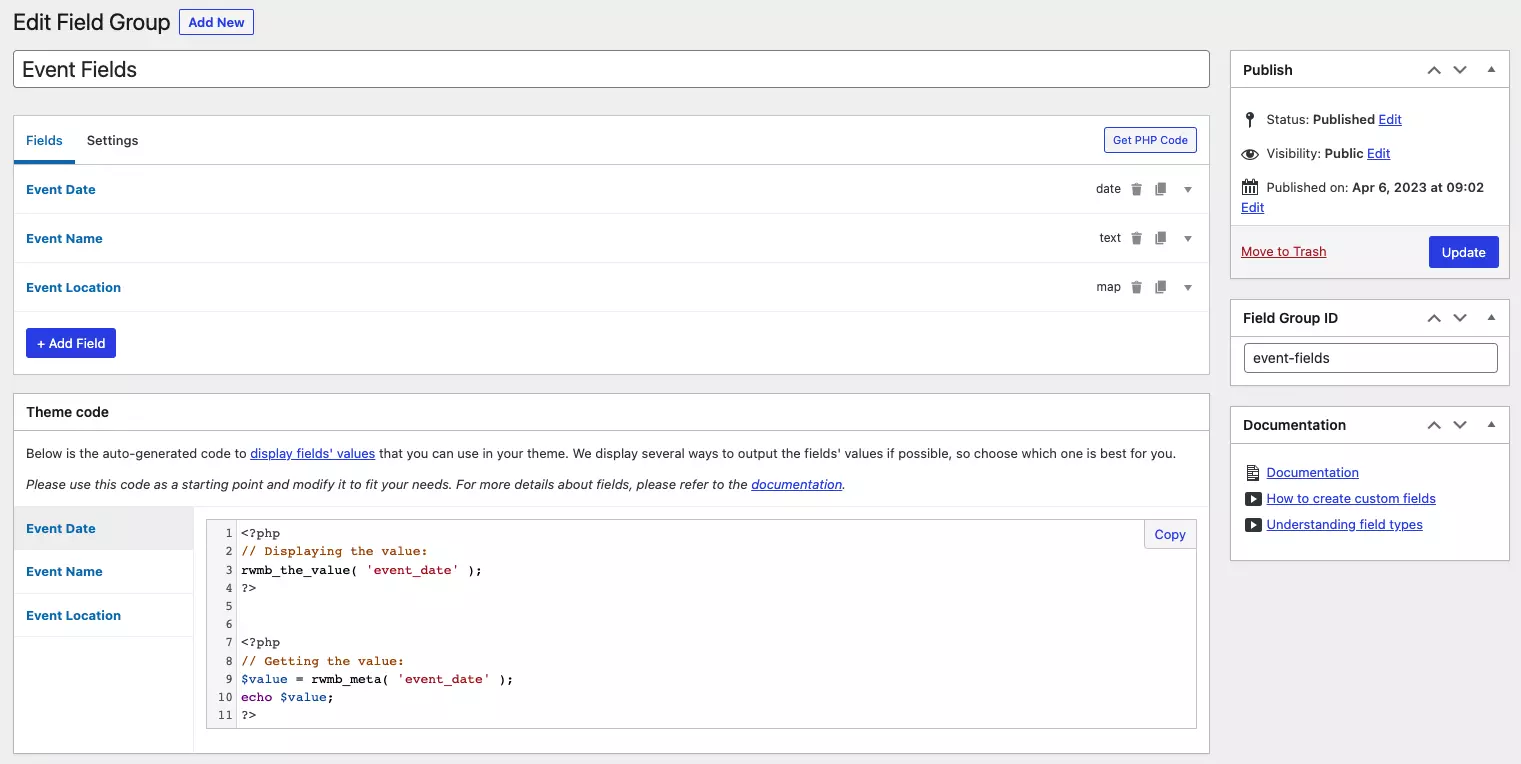
The feature that earns Meta Box its place is custom tables. It can save post and term meta to a purpose-built table instead of wp_postmeta, which is the difference between a directory site that filters instantly and one that times out. Very little else in this price range offers that.
Key features
- 40+ field types in the free core, extensible with your own
- Fields on posts, terms, users, comments and settings pages
- Custom tables for field data instead of wp_postmeta
- Auto-generated template code for every field you create
- Documented migration paths from ACF, Pods and Toolset
- Composer support, which matters if your builds are versioned
Price: free core. On the Meta Box pricing page, personal plans are $49/yr for 1 site (Basic), $99/yr for 3 sites (Ultimate) and $299 one-time for 3 sites (Lifetime). Agency plans are $149/yr and $229/yr for unlimited sites, or $699 one-time. Every annual plan is labelled “annual renewal at regular price”, so there is no year-two discount. Meta Box and Crocoblock are the only two vendors here selling a one-time lifetime licence.

Best for: freelancers who bill by the site and want unlimited client installs without a $249 line item, and anyone building something query-heavy.
Skip it if: you never open a PHP file and you are not buying a bundle. Free Meta Box without the builder is a framework, not a plugin you configure.
Pods: genuinely free, genuinely GPL
Pods sits at 100,000+ active installs with a 4.8 rating, and it is released by Pods Foundation, Inc. and funded by donations. There is no paid tier and no nagging. If a previous version of this article told you Pods costs $49 a year, that was wrong, and it is corrected here.
What you get is a content modeller rather than a field plugin: custom post types, taxonomies, settings pages, and relationships between any of them, plus the ability to extend content types that other plugins registered. It also stays current. Its most recent release was a security release, which is the kind of thing a donation-funded project is not obliged to do quickly and did anyway.
Key features
- Custom post types, taxonomies and settings screens from one UI
- One-to-one, one-to-many and many-to-many relationships
- Extend post types and taxonomies registered by other plugins or your theme
- Blocks, shortcodes and Pods Templates for output
- WPML and Polylang integrations for multilingual field content
- GPL throughout, with no licence key anywhere
Price: free, permanently. A separate third-party add-on called Pods Pro by SKCDEV sells extra features; it is not made by the Pods team and it is not required.
Best for: content models with real relationships in them, and for projects where a recurring licence is politically or practically impossible.
Skip it if: you want same-day paid support. Community forums are the support channel, and that is the deal you accept in exchange for the price.
JetEngine: fields as part of a bigger dynamic toolkit
JetEngine comes from Crocoblock, and buying it for custom fields alone is like buying a car for the radio. Fields are one module. The rest is listing grids, a query builder, relations, custom content types that save to their own table, charts, profile builders and REST endpoints, all wired into whichever editor you use.
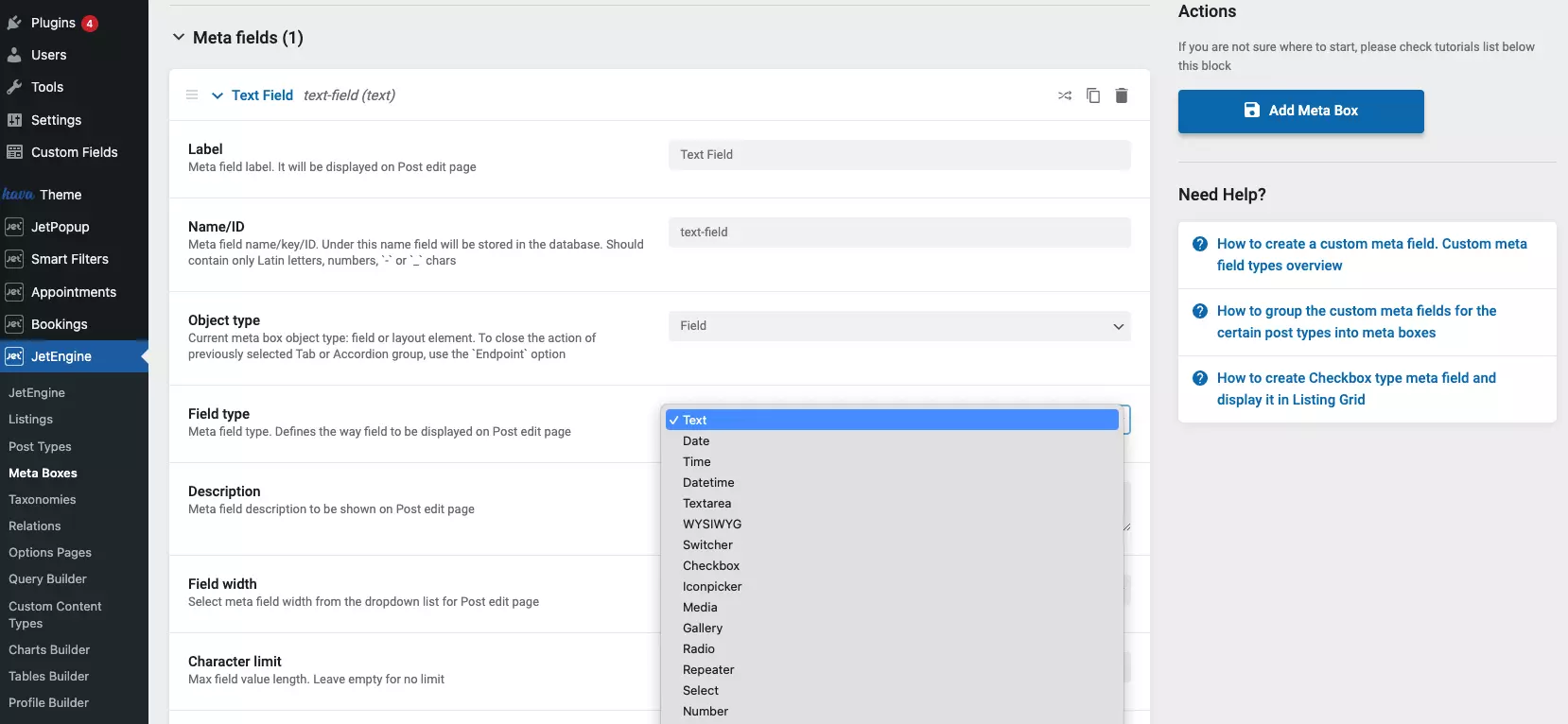
It supports Elementor without requiring Elementor Pro, several of the JetPlugins work in Gutenberg, and JetEngine is integrated with Bricks. If you already live in one of those editors, look at the wider Elementor addons field before you commit, because the editor you keep decides how much of JetEngine you will ever use.
Key features
- Custom post types, custom content types, taxonomies, meta boxes and options pages
- Custom Content Types write to their own database table, not wp_postmeta
- Query builder and listing grids for front-end output without code
- Relations between any two content types, with bidirectional handling
- Charts and tables builders, plus dynamic visibility rules
- Works with Elementor, Gutenberg and Bricks
Price: on the Crocoblock pricing page, JetEngine on its own is $75/yr for one project or $169/yr for unlimited projects. The full bundle is $199/yr All-Inclusive, $249/yr All-Inclusive Plus, or $999 one-time for the Unlimited Lifetime plan. No renewal discount is stated on that page. There is no free trial, but there is a 30-day money-back guarantee.
Best for: directories, listings, booking sites and anything where the fields get filtered and displayed rather than only stored.
Skip it if: your host is tight. JetEngine is heavier than the other plugins here and wants a raised PHP memory limit. That is a real constraint on cheap shared hosting, and worth checking before you buy rather than after. If you are close to the line, see how to increase the WordPress memory limit first.
Toolset: the one that publishes a renewal discount
Toolset comes from OnTheGoSystems, the company behind WPML, and it bundles post types, fields, taxonomies, templates, archives, forms, access control and maps into one account. Its free companion, Toolset Types, was closed in the plugin directory on 4 April 2019 at the author’s request, so this is a commercial-only product now with no free tier to try.
Key features
- Custom post types, fields, taxonomies and repeatable field groups
- Post relationships, including many-to-many
- Templates and archives built visually, with a query and search builder
- Front-end forms and access control included in every tier
- Google and Azure maps integration for directory builds
- WooCommerce Views for product-driven layouts
Price: the Toolset buy page served euros at the check date: €69 for 1 site, €149 for 3 and €299 unlimited, each covering one year of updates and support. Renewals are printed openly at €51, €111 and €224 per year. Toolset is the only vendor in this comparison that publishes a renewal price lower than the first-year price, which is worth something over a five-year client relationship. A 30-day money-back guarantee applies.
Best for: builders who want the whole stack, fields through front-end forms, from one vendor with one renewal date.
Skip it if: you want to try before you buy, or you only need fields. You are paying for a suite, and the money-back guarantee is the only trial on offer.
CMB2: fields defined entirely in code
CMB2 has 300,000+ active installs and the highest WordPress.org rating in this comparison, a clean 5.0 from 91 reviews on its plugin directory listing. There is no field-building UI at all. You declare metaboxes and fields in an array in your theme or plugin, and that is the whole product. Development happens on GitHub and the plugin is free and GPL.
For a developer this is a feature. Field definitions live in version control, they deploy with the code, and there is no database state to sync between staging and production. If you like that approach, the code snippet plugins roundup pairs well with it.
Key features
- Metaboxes, options pages, user meta, term meta and comment meta from PHP arrays
- Front-end forms without a separate add-on
- No admin UI and no database-stored field configuration
- REST API support for registered fields
- Free and GPL, developed openly on GitHub
- Last released 31 May 2026, so it is still maintained
Price: free. No paid tier exists.
Best for: developer-owned sites where the client never touches field configuration, and for plugin authors who need fields inside their own product.
Skip it if: a non-developer needs to add a field next Tuesday. There is no screen for that, by design.
What most custom field roundups get wrong
They compare field counts instead of storage
Every plugin here has more field types than your project needs. What separates them is where the values go. ACF, Secure Custom Fields, Pods and CMB2 all write to wp_postmeta, the same table WordPress uses for everything else. That is fine until you filter or sort by a meta value: those queries scan a table that grows by one row per field per post, and a directory with 5,000 listings and 20 fields each is 100,000 rows before you have written a single query. Meta Box’s custom tables and JetEngine’s Custom Content Types both solve this by writing to a purpose-built table with real columns. If your fields exist to be queried, that is the single most important line in this article, and it is worth reading alongside our notes on speeding up a WordPress site.
They quote first-year prices and stop
Only Toolset publishes a discounted renewal. ACF auto-renews at the same figure, Meta Box says plainly that renewal is at regular price, and Crocoblock states no discount at all. Over three years an ACF Agency licence is $747, not $249. That is not a scandal, it is just the number the pricing page does not show you.
They ignore the exit cost
Field values survive a plugin change because they sit in postmeta under your own keys. Field group definitions and template functions do not. Moving off ACF means rewriting every get_field() call unless you move to Secure Custom Fields, which speaks the same API. Meta Box publishes migration paths from ACF, Pods and Toolset, which is one of the more useful things on its site and one of the least advertised.
They call ACF the safe choice without saying why
It is the safe choice, and the reason is social rather than technical. Two million installs means the next developer knows it, the theme you inherit assumes it, and the plugin you bolt on supports it. That is worth $49 a year on a client site. It is worth nothing at all on a personal site nobody else will ever open.
A short decision path
- Handing the site to another developer? ACF PRO, $49/yr. You are buying familiarity.
- Want repeaters and options pages for nothing? Secure Custom Fields. Same field types, no licence.
- Running ten or more client sites? Meta Box Agency Basic at $149/yr unlimited, the cheapest unlimited dollar-priced licence in the table above.
- Building a directory or listing site? JetEngine or Meta Box with custom tables. Do not put queryable data in postmeta.
- No budget and no licence keys allowed? Pods, or CMB2 if you would rather write PHP.
- Want fields, templates, forms and access control from one vendor? Toolset, and take the lower renewal into account.
If you are still choosing an editor as well as a field plugin, settle that first. Our comparison of visual page builders for WordPress is the better starting point, because the builder usually decides which field plugin is least painful.
Frequently Asked Questions
Is Secure Custom Fields the same plugin as ACF?
No. Secure Custom Fields is a fork of ACF maintained by WordPress.org; ACF is maintained by WP Engine at advancedcustomfields.com. They share the acf_ function names and store data in the same postmeta rows, so templates written for one usually run on the other unchanged.
Which custom field plugin do I already have installed?
Open Plugins in wp-admin and read the author line. Advanced Custom Fields (ACF) is by WP Engine. Secure Custom Fields is by WordPress.org. Sites that auto-updated in October 2024 were switched to the fork without anyone clicking anything, so check rather than assume.
Do I need the paid version of a custom field plugin?
Only for repeatable and layout-style fields. Plain text, image, date and select fields are free in every plugin here that has a free version. Repeaters, flexible content and options pages are paid in ACF, free in Secure Custom Fields, and bundled into the paid tiers of Meta Box and JetEngine.
Will switching plugins delete my custom field data?
Field values survive, because they sit in wp_postmeta under your own field names. What breaks is the field group definition and any template function unique to the old plugin. Export your field groups first, take a database backup, and test on staging before you switch on production.
Do custom fields slow down a WordPress site?
The fields themselves are cheap. The cost comes from meta queries: filtering or sorting posts by a meta value scans wp_postmeta and gets slow once you pass a few thousand rows. Store anything you filter on in a custom table, or use a plugin that offers one.
Is Pods really free with no paid tier?
Yes. Pods is released by Pods Foundation, Inc. and funded by donations, with no upsell inside the plugin. A separate third-party add-on called Pods Pro by SKCDEV sells extra features, but it is not required and is not made by the Pods team.
Can I use two custom field plugins on the same site?
Technically yes, except for ACF and Secure Custom Fields, which deactivate each other because they declare the same functions. Running two different frameworks side by side is legal but messy: two field UIs, two sets of template calls, and two things to keep licensed.
What happens when my licence expires?
The plugin keeps working and your data stays put. You lose updates and support, which matters most for security releases. Meta Box and ACF renew at the same price they charge new customers; Toolset publishes a lower renewal rate on its buy page.
Our call
Install Secure Custom Fields. It is free, it is maintained on WordPress.org, and it hands you the repeater, flexible content, clone, gallery and options pages that ACF charges for. For most sites the decision ends there, and the honest version of this article is one paragraph long.
Buy Meta Box when the site outgrows postmeta or you want a support inbox: $149 a year unlimited is what a working freelancer should be paying. Buy ACF PRO when the client already runs it or the next developer will expect it, and treat the $49 as documentation cost rather than software cost. Take JetEngine when the fields are the start of a dynamic front end rather than the end of a content model, and check your host’s memory limit before you pay. Pods and CMB2 stay on the list because they are free and honest about it, and Toolset stays because it is the only one here that charges less in year two than in year one.


[…] or domain per language, translation management for teams, and support for the fields created by custom field plugins such as […]