

Layout shift is the reason a WordPress page loads, you reach for a link, and the whole thing jumps because a cookie bar, an ad slot or a web font finally turned up. Google scores it as Cumulative Layout Shift, and most of the advice still circulating describes how Chrome measured CLS in 2020 rather than how it measures it now.
This guide covers what Chrome counts today, the fixes that move the number on a real WordPress site, what each one costs you elsewhere, and how to confirm it worked.
Quick verdict
Biggest win for most sites: reserve height for the four things that arrive late. Ad slots, cookie and consent bars, embedded video, and the swap from fallback font to web font. On a typical WordPress theme, that is where the shift worth fixing lives.
Best free route: WordPress core has emitted image dimensions since 5.5 and marks the likely LCP image since 6.3, so images are mostly handled already. Add aspect-ratio to your embed and ad containers, and set a font-loading strategy. That is a child-theme CSS file, not a purchase.
Skip it if: your field CLS is already under 0.1 at the 75th percentile. CLS is close to pass or fail. Nobody is rewarded for dragging 0.08 down to 0.02, and that hour is better spent on LCP.
Our call: fix reserved space by hand in CSS and templates. A performance plugin genuinely helps with fonts and script deferral, but no plugin can guess how tall your ad container is supposed to be.
What Chrome actually measures, and what changed
CLS scores visual stability. Google’s CLS documentation puts a good score at 0.1 or less, needs improvement between 0.1 and 0.25, and poor above 0.25, assessed at the 75th percentile of real page loads. Mobile and desktop are graded separately, so a site can pass one and fail the other.
Three details in that documentation quietly invalidate a lot of older WordPress advice.
The score is not on a 0 to 1 scale
CLS is unbounded. A page whose ad script reflows the article three times can score well past 1. Any guide telling you the range is 0 to 1 is repeating a misreading from the metric’s first year, and the rest of its advice is usually the same vintage.
Only the worst burst counts, not the total
Chrome groups shifts into session windows: shifts less than one second apart, with the window capped at five seconds. Your CLS is the largest of those bursts, not the sum of everything that moved. That is good news and bad news. Twenty tiny scattered shifts may cost you almost nothing, while one late ad injection can decide your score on its own.
Shifts you caused on purpose are excluded
Anything that moves within 500 milliseconds of a tap, click or keypress carries a hadRecentInput flag and is left out. An accordion opening when the reader clicks it is fine. Scrolling and pinching do not count as input, so content that reflows as the reader scrolls down is still charged to you.
If you run a headless or single-page front end
Chrome shipped soft navigation support unflagged from Chrome 151 in July 2026. Until then, a React or similar front end accumulated CLS across every in-app route change onto one page load. Soft navigations give a standard boundary at which CLS can be reset per view. Classic server-rendered WordPress was never affected by this, but headless builds were being scored unfairly and now are not.
Thresholds and measurement behaviour checked August 2026 against Google’s own Core Web Vitals documentation.
For scale: the 2025 Web Almanac performance chapter found 81% of mobile pages and 72% of desktop pages hit a good CLS, using July 2025 field data. CLS is one of the easier vitals to pass, which is precisely why failing it stands out.
How to avoid layout shift in WordPress, step by step
These are in the order that pays. Do not start at step five because it sounds more technical.
Step 1. Check what WordPress is already doing for you
View source on a published post and look at an image inside the content. Since WordPress 5.5, core adds width and height attributes where it knows them, and only adds loading="lazy" to images that carry those attributes. WordPress 6.3 went further, adding fetchpriority="high" to the image it judges most likely to be the LCP element and raising the wp_omit_loading_attr_threshold default from 1 to 3 so the first three images stay eager.
If your images are missing dimensions, something in your stack stripped them. Usual suspects: a theme’s custom image function, a CDN or image plugin rewriting markup, or a lazy-load script replacing src with a placeholder. Find that before you write a single line of CSS.
<!-- what a healthy content image looks like -->
<img src="/wp-content/uploads/2026/08/photo.webp"
     width="1200" height="675"
     loading="lazy" decoding="async"
     alt="..." />
Step 2. Reserve height for anything that arrives over the network
This is the fix. Ads, oEmbeds, iframes, maps, review widgets, related-post carousels: every one of them is a zero-height box until its payload lands, and then it is 250 pixels tall and everything below it moves.
Give the wrapper a shape before the content exists. Google’s optimisation guide recommends aspect-ratio for fixed-shape content and min-height where the height genuinely varies, and is honest that variable-height ads cannot always be pinned exactly.
.ad-slot {
  min-height: 280px;   /* the tallest creative you actually serve */
}

.wp-block-embed__wrapper iframe {
  aspect-ratio: 16 / 9;
  width: 100%;
  height: auto;
}
Pick the height from what you serve, not from a blog post. If your ad network rotates a 250 and a 280, reserve 280 and live with the whitespace.
Step 3. Stop the font swap from resizing your text
A fallback font and a web font almost never occupy the same space. When the web font arrives, every paragraph reflows and everything under it moves. There are two honest answers.
- Match the metrics. Declare the fallback with
size-adjust,ascent-override,descent-overrideandline-gap-overrideso the swap is invisible. More work, no visual compromise. - Use
font-display: optional. The browser uses the web font only if it is ready in time, otherwise it keeps the fallback for that page view. Zero shift, and some visitors never see your brand font.
Self-host the files either way. A third-party font host adds a DNS lookup and a connection before the swap can even begin, which widens the window in which the shift happens. If your server response time is already slow, that window gets wider still.
Step 4. Get the cookie bar and the notification strip out of the flow
A consent banner that inserts itself at the top of the document pushes the entire page down, above the fold, on the first paint. It is the first thing we check when a WordPress site posts a clean lab score and a bad field score.
Position it as a fixed overlay so it sits over the page instead of inside it. If your legal team insists on a strip that pushes content, render the container server-side at its final height rather than letting JavaScript inject it after paint. The same rule covers WooCommerce free-shipping bars and dismissible announcement banners.
Step 5. Animate with transform, never with layout properties
Animating top, left, height, width or margin triggers layout, and layout triggers shift. transform: translate() and transform: scale() are composited, so they cannot move their neighbours and do not count toward CLS at all.
Sliders, sticky headers that grow on scroll, and hover cards that expand are where this bites on a WordPress site. Most of it lives in a theme or page builder module rather than your own CSS, so check the hero section before you rewrite anything.
Step 6. Audit the lazy loader itself
Native lazy loading on an image with width and height is safe. JavaScript lazy loaders that swap in a 1×1 placeholder and replace it on scroll will shift every image on the page, one at a time, all the way down. If you use one of the lazy loading plugins, confirm it preserves dimensions and that it is not lazy-loading your hero image, which wrecks LCP while you were busy fixing CLS.
The same goes for image optimisation plugins that rewrite markup to serve WebP or AVIF. Rewriting is where dimensions get dropped.
Step 7. Keep the page eligible for bfcache
When a visitor hits back, a bfcache-eligible page restores fully painted, with no shift. A page that is not eligible re-renders from scratch and pays the whole CLS bill again. The usual blockers are an unload handler somewhere in a plugin and a no-store cache header, both of which are worth grepping for.
Step 8. Verify it, in the lab and in the field
This is the step people skip. Both readings matter, and they disagree for a reason.
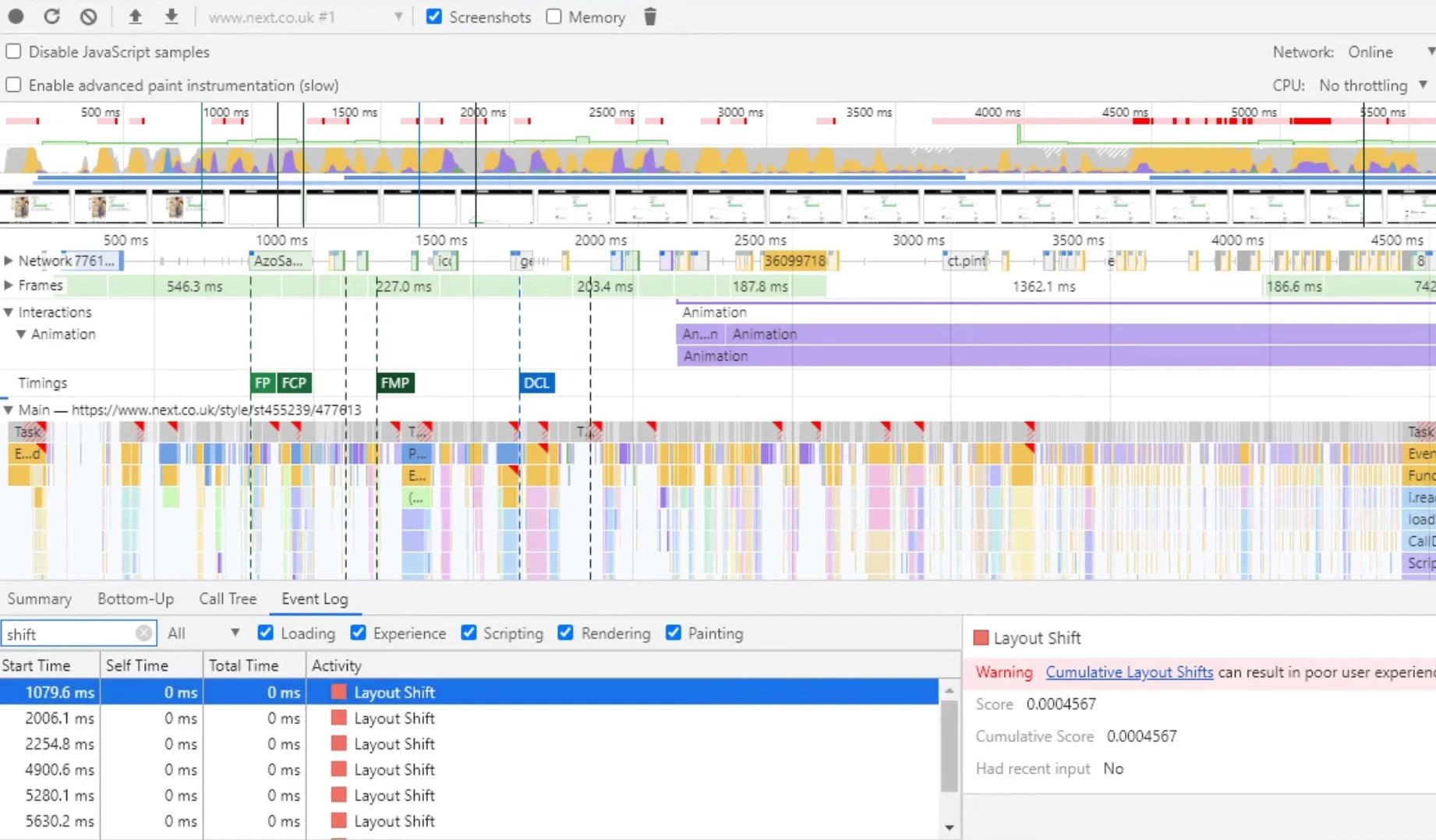
Lab. Open Chrome DevTools, go to the Performance panel, reload with recording on, and look at the layout shift entries. Each one gives you a score and whether it had recent input. The panel has been reorganised several times since this screenshot was taken, but the data you want is the same: which element moved, when, and how much.
Field. PageSpeed Insights shows real Chrome user data above the lab audit. That field section is a rolling 28-day window, refreshed daily, which is why a fix you shipped on Tuesday is invisible on Wednesday. Give it four weeks before you judge it.
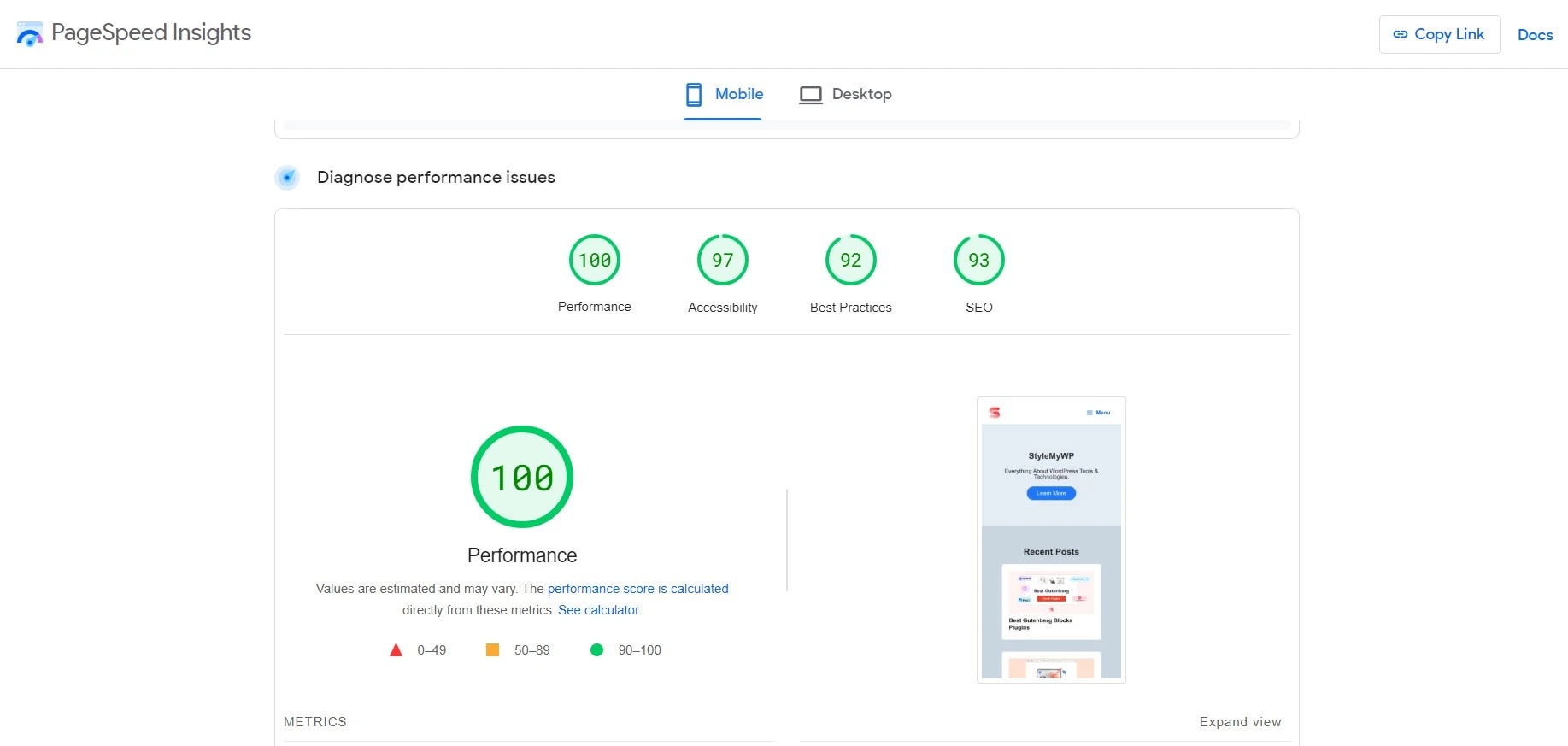
When lab and field disagree. Believe the field and go hunting for what a lab run never does: it does not scroll, it does not accept a cookie banner, it is not logged in, and it does not see personalised ad inventory. The web-vitals attribution build closes that gap by reporting largestShiftTarget, a CSS selector for the element behind your worst shift, from real sessions. Ship it to your analytics and you stop guessing.
What breaks when you do this
Every fix above has a cost. Anyone who tells you otherwise has not shipped one.
font-display: optionalmeans some visitors never see your typeface. On a slow connection they get the fallback for the entire page view. If your brand lives in the font, match metrics instead and accept the extra work.- Reserved ad heights create whitespace. When the network fails or the slot goes unfilled, you have a 280-pixel hole in your article. That is the trade: a hole beats a jump, but it is still a hole.
- Reserving space above the fold pushes your LCP element down. Fix CLS carelessly and LCP gets worse. Measure both before and after, not only the one you set out to fix.
aspect-ratiofights themes that forceheight: auto !importanton images. Plenty of older WordPress themes do. You will need a more specific selector, not a bigger hammer.- Overlay cookie bars cover content on small screens. Check the 360-pixel viewport before you ship, or you have traded a layout shift for a dismiss button nobody can reach.
What most CLS guides get wrong
Four claims turn up constantly and all four are wrong.
“Check your CLS weekly.” Field data is a 28-day rolling average. Checking weekly shows you sampling noise and tempts you into changing something that was fine. Check after you ship, then again at four weeks.
“Lazy loading fixes layout shift.” Lazy loading is a bandwidth and LCP tool. Done badly it is a cause of CLS, not a cure. It earned its place in a WordPress speed strategy on other merits entirely.
“Install a caching plugin and CLS goes away.” Caching changes when bytes arrive, not whether you reserved space for them. Caching plugins are worth having, but a cached page with an unreserved ad slot still jumps.
“A good CLS score fixes your rankings.” CLS is one page experience signal among many and it is nowhere near relevance in weight. The reason to fix it is that people misclick, abandon carts and bounce, which shows up in your conversion rate long before it shows up in a ranking report.
Do you need to buy anything?
Steps 2 through 5 are CSS and template work. They cost you an afternoon. Two paid plugins are worth naming because they take real work off the list, though neither is a CLS tool as such.
WP Rocket handles font preloading, script delay and critical CSS in one place, at $59 per year for a single site on its own pricing page, with Plus at $119 for three sites and Multi at $299 for fifty. Licences renew annually; the pricing page quotes one figure per plan rather than a separate renewal rate. Currency served is USD.
Perfmatters is the lighter, more surgical option, useful mainly for its per-page script manager and local font hosting. Its pricing page lists $29.95 per year for one site, $59.95 for three and $124.95 unlimited, and states that a 15% discount is applied automatically on renewal. Also USD. Of the two, Perfmatters is the cheaper entry point in USD, but it does no caching, so it is a companion rather than a replacement.
Plugin prices checked August 2026 on each vendor’s own pricing page.
Neither plugin substitutes for reserved height. If you are on a host whose stack already bundles caching, check what you are paying for twice before adding another licence; the managed WordPress hosting comparison has the details.
Which fix do you actually need?
- Field CLS already under 0.1? Stop. Go and work on LCP.
- Lab score fine, field score bad? Cookie banner, ad inventory, logged-in views or scroll-triggered content. Start at step 4.
- Lab score also bad? Images and fonts. Start at step 1, then step 3.
- Running display ads? Step 2, then accept you will land near 0.05 rather than 0. That is a pass and it is fine.
- Built on a page builder and the hero moves? Step 5. It is almost always an entrance animation on the first section.
- Score is fine on load and bad after scrolling? A JavaScript lazy loader without reserved dimensions. Step 6.
Frequently Asked Questions
What is a good CLS score?
A good CLS is 0.1 or less, measured at the 75th percentile of real page loads. Between 0.1 and 0.25 needs improvement, and above 0.25 is poor. Mobile and desktop are scored separately, so a site can pass on one and fail on the other.
Does CLS run from 0 to 1?
No. CLS is unbounded. A page with a badly behaved ad script or an aggressive infinite scroll can score well above 1. Any guide claiming a 0 to 1 range is repeating a misreading from the metric’s first year, and its other advice is usually just as old.
Why does PageSpeed Insights show two different CLS numbers?
The upper section is field data from real Chrome users over a rolling 28-day window. The lower section is a single lab run in a simulated mobile browser. Lab runs do not scroll, accept cookie banners or log in, so they usually report a much lower CLS than reality.
How long before a CLS fix shows up in the reports?
Field data moves on a 28-day rolling average, so allow roughly four weeks before the number fully reflects your change, and longer before Search Console regroups the URLs. Lab tools show the effect immediately, which is exactly why you check both.
Do you need a plugin to fix layout shift in WordPress?
Usually not. The expensive shifts come from ad slots, consent bars and font swapping, and all three are fixed in CSS and templates. A performance plugin helps with font hosting and script deferral, but no plugin can guess how tall your ad container should be.
Does lazy loading cause layout shift?
It can. Native lazy loading on an image that carries width and height attributes is safe. JavaScript lazy loaders that swap in a tiny placeholder and replace it on scroll will shift every image on the page as the reader moves down it.
Is CLS measured only while the page loads?
No. Chrome records shifts for the life of the page, including while the visitor scrolls. Your score is the largest burst of shifts less than a second apart within a five-second window, so one late ad halfway down an article can decide the whole number.
My accordions and dropdowns move content. Does that hurt my score?
Not if the reader triggered them. Shifts within 500 milliseconds of a tap, click or keypress are flagged and excluded. Scrolling and pinching do not count as input, so anything that reflows purely because the reader scrolled is still charged to you.
The call
If you do one thing from this page, reserve height for the boxes that arrive late. Ad slots, embeds and the consent bar are where WordPress layout shift actually comes from, and none of them are fixed by a plugin setting. Images are mostly handled by core already.
Then set a font-loading strategy you can defend, animate with transform, and stop there. Ship it, check DevTools the same day for the lab reading, and check field data at four weeks. If you land under 0.1 at the 75th percentile, you are done. Aiming for 0.00 is a hobby, not an optimisation.



[…] off, which is a fixable problem but a tedious one. If you are already fighting it, start with how to avoid layout shift in WordPress rather than blaming your […]
[…] and speed problems that quietly cost you positions. If yours are red, start with our guide to fixing cumulative layout shift in WordPress before you buy […]
[…] fix (font-display, preloading, or just using a system stack for headings) is in our notes on how to avoid layout shift in WordPress. Second, if your H2 and H3 look nearly identical at a glance, the visual hierarchy has stopped […]
[…] before it arrives, and only then worry about the last 20 KB. Sizing is also the cheapest way to avoid layout shift in WordPress, which is a separate Core Web Vitals metric that compression does nothing for. If you want finer […]
[…] article, because they all happen after the first byte arrives. They belong to image optimisation, layout stability and general page speed work. Keep the diagnoses separate or you will spend a weekend optimising […]
[…] anything injected late. A slider is exactly that kind of late-injected block. Our walkthrough on how to avoid layout shift in WordPress covers the same fix at theme […]
[…] reading. Reserve the height in CSS, set width and height on every image, and see our guide to layout shift in WordPress if the score is already […]
[…] damages a page’s Core Web Vitals. If your accordion sits above other content, read up on how to avoid layout shift in WordPress before you ship […]
[…] fonts that swap after paint. Each has a fix, and we have written up the specifics in our guide to stopping layout shift in WordPress. Check the number on a real phone rather than a desktop emulator, because this is a problem that […]
[…] quiz also shifts layout as answer images load, so give the images explicit dimensions; our notes on avoiding layout shift and speed optimisation cover the […]
[…] One more, unique to multi-step: steps of different heights shift the page every time someone clicks Next. If step one is three fields and step two is nine, the content below the form jumps. Set a minimum height on the form wrapper, or keep step lengths roughly even — the same reasoning behind everything in our guide to avoiding layout shift in WordPress. […]