
Choosing a WordPress discussion and comments plugin usually starts after something has gone wrong: a moderation queue full of spam, a comment section that drags the page down, or a thread nobody can reply to properly. WordPress already ships with comments, so the real question is not which plugin to install, it is whether you need one at all. Below is what each option costs, what it does to your pages, and who should skip it.
Quick verdict
- Best overall: wpDiscuz. Free, actively maintained, and it stores comments in the normal WordPress tables, so you can walk away from it any time without losing a thing.
- Best free: the comment system already in WordPress, with Akismet doing spam. It costs nothing, adds no third-party requests, and handles the traffic most sites actually get.
- Best paid: Thrive Comments, but only if you already pay for Thrive Suite. On its own the renewal is steep for a comment box.
- Skip it if: you are looking at Disqus for a small site. The free plan is ad-supported by design, and your comments end up living on someone else’s servers.
- Our call: turn on native comments first. Add wpDiscuz only when the native form is genuinely holding a real conversation back.
WordPress comment plugins compared
| Plugin | Free version | Paid entry price | What renewal costs | Best for |
|---|---|---|---|---|
| Native WordPress comments | Yes, built into core | None | None | Almost every site, at least to start |
| Akismet | Personal tier is name-your-price | Commercial plans required for business sites | Billed yearly | Spam filtering behind any option in this table |
| wpDiscuz | Yes, the full plugin | Addons Basic Bundle $120, Full Bundle $190, unlimited sites | Yearly license for continued updates; renewal figure not published | Blogs that want threading, voting and reply notifications |
| Thrive Comments | No | Thrive Suite $299 first year, up to 5 sites | $599 a year; the vendor states all annual renewals are at full price | Sites where comments feed an offer or a course |
| Disqus | Yes, Basic, with a required ad placement | Plus from $12 a month or $132 a year, up to 3 sites | Same list price, no intro discount published | Publishers who want the thread hosted elsewhere |
| Jetpack Comments | Yes, a free module | Not needed for the comment feature | Not applicable | Adding social login to the native form |
Native WordPress comments plus Akismet

This is the option most roundups skip past, and it is the right answer for more sites than any plugin on this page. WordPress has had threaded comments, moderation queues, comment blacklists and email notifications built in for years. All of it lives under Settings, then Discussion, and none of it costs anything or adds a single external request to your pages.
Spam is the part core does not solve, which is what Akismet is for. It has over five million active installations and a 4.7 rating from 1,186 reviews on its WordPress.org listing. It checks each comment against a shared network and files the obvious junk in the spam folder before you ever see it.
Key features: threaded replies, comment moderation and approval rules, per-post comment control, comment blocklist by word, IP or email, and email notification of new comments. Akismet adds automatic spam filtering and a spam queue you can review or empty.
Price: WordPress comments are free. Akismet’s Personal tier is name-your-price and intended for personal sites, and the slider goes down to nothing. Commercial sites are asked to use the Pro or Business plans, which are billed yearly. Akismet’s pricing page serves different currencies depending on where you load it, so read the figure it shows you rather than one quoted in an article.
Best for: any site under a few hundred comments a month, which is most sites. Also the correct starting point before you spend money, because you cannot tell whether you need a comment plugin until you know what your actual comment volume looks like.
Skip it if: you need voting, comment sorting, inline replies without a page reload, or a rating widget attached to the comment form. Core will not do those and there is no setting that makes it.
One thing worth knowing before you add anything: the native comment form posts to wp-comments-post.php, which is a full PHP request. On cheap shared hosting a burst of comment traffic lands directly on your server, so if comments feel slow the fix is usually server response time, not the comment system.
wpDiscuz
wpDiscuz is what native comments would look like if someone had kept working on them. It replaces the comment form with an AJAX-driven one, adds inline replies, comment voting, sorting, live notification of new replies, and custom comment fields you can define yourself. The comments themselves still go into the standard WordPress comments table, which is the single most important thing about it.
The plugin listing shows 60,000+ active installations and a 4.7 rating from 578 reviews, on version 7.6.67, updated within days of this check and tested against the current WordPress release. For a free plugin carrying a feature set this size, that maintenance record is the reason it sits at the top of our list rather than the feature list.
Key features: AJAX comment posting and loading, nested and inline replies, comment up and down voting, sort by newest, oldest or most voted, custom comment form fields including star ratings, comment subscriptions, social login through addons, and a lazy-load mode that fetches the thread after the page renders.
Price: the plugin is free with no feature wall on the core commenting experience. Paid extras come as bundles on the gVectors addon bundles page: the Addons Basic Bundle at $120 for 17 premium addons, and the Addons Full Bundle at $190 for all of them, both on an unlimited-site license with one year of premium support. The licence is yearly for future updates. gVectors does not publish a renewal figure, so budget for one rather than assuming updates stay free.
Best for: blogs and news sites where the comment section is genuinely active and readers want to reply to each other rather than to you. The AJAX loading also plays nicely with page caching, because the thread is fetched after the cached HTML has already been served.
Skip it if: you get four comments a month. wpDiscuz loads its own CSS and JavaScript on every post with comments open, and there is no sense paying that on pages nobody comments on. Also skip the addon bundles until you can name the specific addon you want, because buying seventeen of them to get one is a bad trade.
Thrive Comments
Thrive Comments is the only option here built by people who think of a comment section as a conversion surface rather than a feedback box. It adds comment upvoting, badges, a gamified points system, and the feature it is genuinely known for: redirecting a first-time commenter to a page of your choosing after they post, which is where the email signup or the related offer goes.
It also has the moderation tooling the free options do not: comment assignment so a team member can own a thread, moderation from the front end without opening wp-admin, and a rule that lets you feature the best comments at the top. Like wpDiscuz, it writes to the native comments table, so leaving does not cost you your archive.
Key features: comment upvotes and badges, post-comment redirects, social sharing prompts after posting, comment moderation from the front end, comment assignment for teams, featured comments, and reply notifications.
Price: it ships inside Thrive Suite. The Thrive Suite pricing page lists $299 a year for up to 5 websites as introductory pricing against a regular price of $599 a year, and states that all annual renewals are at full price. There is also a $149 quarterly plan. At those listed rates four quarters comes to $596, which is $3 under a full-price yearly renewal, so the quarterly plan is not the expensive option people assume it is. Thrive also sells the plugin standalone, but the Suite pricing page does not list that figure, so check it at checkout.
Best for: sites that already own Thrive Suite, and sites where a comment genuinely leads somewhere, such as a course, a coaching offer or a list you are building. If you are trying to monetize a WordPress blog, the post-comment redirect is the one feature on this page with a direct line to revenue.
Skip it if: you only want Thrive Comments. Paying $299 and then $599 a year for a comment plugin is difficult to justify unless you use several of the other Suite plugins too. The renewal is the number to plan around, not the first-year price.
Disqus

Disqus is a hosted comment network. Your comments live on Disqus infrastructure and get injected into your post by JavaScript, which is both the appeal and the problem. The appeal is real: you get cross-site identity, a moderation dashboard that works across every site you own, and spam filtering you do not have to think about.
The problem is what the free tier is. Disqus’s own plans and pricing documentation describes the Basic plan as free and ads-supported, with a top ads placement required, and notes that sites which cannot run ads are not eligible for Basic at all. That is the deal. Free means you are selling ad inventory on your own post to a third party, in the position directly above your comment thread.
There is a second signal worth weighing. The Disqus Comment System listing on WordPress.org sits at 2.7 out of 5 across 219 reviews, with 113 of those at one star, and the plugin still declares PHP 5.6 as its minimum. That is not a rating you see on a plugin people are happy with.
Key features: hosted comment threads, single sign-on across the Disqus network, a central moderation dashboard, automatic spam filtering, comment voting and sorting, audience analytics, and a full export of your threads if you leave.
Price: Basic is free with the required ad placement. Plus removes ads and starts at $12 a month, or $132 a year if you pay annually, which works out to $11 a month for the tier covering 100,000 pageviews and up to 3 sites. Higher Plus tiers run $20 a month for 350,000 pageviews and $35 a month for 900,000. Pro starts at $115 a month, or $1,260 a year annually, for 1 million pageviews and up to 20 sites. Business is quoted individually.
Best for: publishers running several sites who want one moderation queue and one commenter identity across all of them, and who are paying for Plus or Pro so the ads are gone. At that size the hosted model earns its keep.
Skip it if: you run one blog. You would be adding a third-party script and an ad slot to every post to solve a problem that a free plugin solves locally. If you do run Disqus, the honest mitigation is to defer the embed until the reader scrolls to it, which is standard lazy loading territory, or to switch it off per-page with a script manager like Perfmatters.
There is a compliance angle too. Handing visitor data to a hosted comment network makes that network a processor you are responsible for disclosing, which means it belongs in your privacy policy and, in the EU and UK, in your consent flow. That is worth setting up properly with GDPR compliance plugins before you switch it on, not after someone asks.
Jetpack Comments
Jetpack Comments is a module inside the free Jetpack plugin, not a product you buy. It swaps the native comment form for one that lets readers sign in with a WordPress.com or social account, while the comments still land in your own database. It is off by default and you turn it on from the Jetpack settings after connecting the site, per Jetpack’s own documentation.
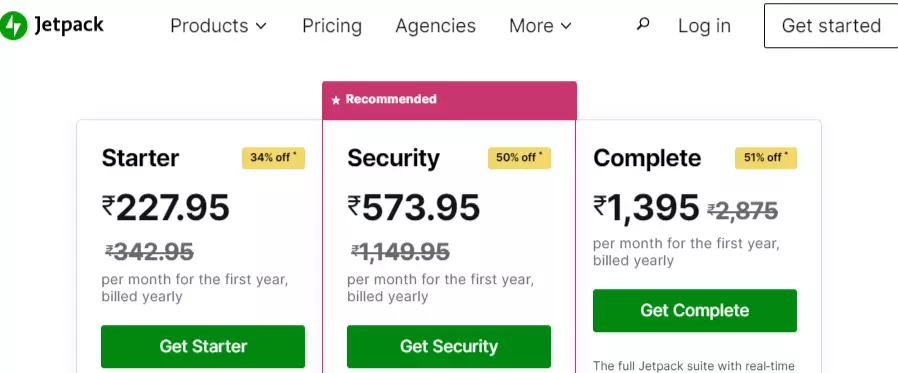
The screenshot above is Jetpack’s paid pricing, and it is worth a note because it makes the point this article keeps making. Those plans buy backup, scanning and security, not the comment feature, and every price on it is a discounted first-year rate with the full price struck through beside it. The page also renders in whichever currency your region gets. Read the renewal, not the badge.
Key features: social and WordPress.com login on the comment form, subscription checkboxes so readers can follow the post or the blog, and comments stored in your own WordPress tables.
Price: free as part of Jetpack. It requires a WordPress.com connection, which is the actual cost: you are adding an account dependency and Jetpack’s own footprint to your site to get a login form.
Best for: sites already running Jetpack for backups or stats, where enabling one more module costs nothing extra.
Skip it if: you do not already run Jetpack. Installing a plugin of that size for a social login button is a poor trade, and it will show up when you next try to speed up your WordPress site.
CommentLuv, and why it is still on every other list
CommentLuv used to appear in every WordPress comment plugin roundup, including an older version of this one. It let a commenter attach a link to their latest post, which made it popular with bloggers chasing links a decade ago.
Do not install it. Its WordPress.org listing carries a notice that the plugin was closed on 7 March 2024 and is not available for download, with the stated reason given as a security issue. Closed for a security issue is the worst reason a plugin can leave the directory, because it means the vulnerability outlived the maintainer’s willingness to fix it. If you have it installed on an old site, remove it and run a scan with one of the WordPress security plugins we recommend.
It is a useful test for any roundup you read, including this one. If a list still recommends CommentLuv, nobody checked anything before publishing it.
What most comment plugin roundups get wrong
They call Disqus free without finishing the sentence. Free means ad-supported with a required top placement, in Disqus’s own words. If you would not sell that slot on your post to an advertiser you have never met, you should not accept it as payment for a comment box either.
They quote first-year prices as if they repeat. Thrive Suite is $299 the first year and $599 after. Jetpack’s plan badges are first-year discounts. The number that matters is the one on your card in year two.
They talk about speed without measuring anything. Any hosted comment system moves the thread onto someone else’s JavaScript, and a widget that binds event handlers as it loads is exactly the kind of thing that shows up in interaction latency. Google’s threshold for good Interaction to Next Paint is 200 milliseconds at the 75th percentile. Run your own before-and-after on a real post rather than trusting a number in an article, ours included. A comment embed that reserves no space is also a classic cause of layout shift when it finally arrives.
They never mention the exit cost. wpDiscuz, Thrive Comments and Jetpack all write to the standard WordPress comments table, so switching between them is close to free. Disqus stores threads on its own servers. Leaving means exporting from Disqus and importing back into WordPress, and you want that done and verified before you deactivate anything. Take a full backup first, because comment imports are one of the few operations that can duplicate hundreds of rows if you run them twice.
They list plugins nobody maintains. CommentLuv is the obvious example, and it is still sitting on competing lists two years after the directory closed it. Before installing anything from a roundup, open the WordPress.org listing and check the last update date and the tested-up-to version yourself. It takes ten seconds.
Which one should you actually install?
- Under ten real comments a month: native WordPress comments and Akismet. Install nothing else. Set first-time comments to require approval and close comments on posts older than 90 days.
- An active comment section, readers replying to each other: wpDiscuz, free version. Only look at the addon bundles once you can name the addon you want.
- You already pay for Thrive Suite: Thrive Comments. It is included, so use it.
- You already run Jetpack: switch the Comments module on and see whether social login lifts anything. It is free to try and free to turn off.
- Several sites, one moderation team, real budget: Disqus on Plus or Pro, never Basic.
- Comments are pure spam and nobody reads them: turn them off entirely. Settings, then Discussion, uncheck allow people to submit comments, and drop the leftover markup with a code snippet plugin rather than editing your theme.
Frequently Asked Questions
Do I need a WordPress comments plugin at all?
No. WordPress ships with a comment system and for most blogs it is enough. Turn it on under Settings, then Discussion, add Akismet for spam, and require approval for first-time commenters. Add a plugin only when you want threading, voting or notifications that core does not provide.
Is Disqus bad for site speed?
Disqus renders the thread from its own servers using JavaScript, and the free Basic plan requires an ad placement, which pulls in ad-tech requests on top. That is a real cost, but the size of it depends on your theme and host. Measure your own pages before and after.
Does Disqus really show ads on free sites?
Yes. Disqus describes its Basic plan as free and ads-supported, with a top ads placement required. Sites that cannot run ads are not eligible for Basic and have to pay for an ad-free plan instead. Plus starts at 12 dollars a month and removes the ads.
Will I lose my comments if I switch plugins?
Not if you switch carefully. wpDiscuz, Thrive Comments and Jetpack all read the standard WordPress comments table, so moving between them keeps your data intact. Disqus stores threads on its own servers, so export from Disqus and import into WordPress before you deactivate it.
Is Akismet free for a business site?
The Personal tier is name-your-price and intended for personal sites; commercial sites are asked to use the Pro or Business plans, billed yearly. Akismet’s pricing page serves different currencies by region, so check the figure it displays for you before you budget for it.
Do blog comments still help SEO?
Real comments add relevant text to the page and give people a reason to come back, which is worth something. Thin one-line comments add nothing. Moderate hard, and remember that a hosted system like Disqus injects the thread with JavaScript rather than putting it in your HTML.
How do I stop comment spam without paying for anything?
Require manual approval for first-time commenters, close comments automatically on posts older than a few months, disable comments on pages, and require a name and email address. That combination plus Akismet’s free Personal tier stops the large majority of spam on a small site.
Do comment plugins break page caching?
They can. Cached HTML will happily serve a stale comment count or an out-of-date thread. Plugins that load comments over AJAX, such as wpDiscuz, avoid most of that because the thread is fetched after the cached page renders. Test a real post while logged out.
Our call
Install nothing. That is the honest recommendation for the majority of people who search for a WordPress discussion and comments plugin in 2026. Switch on the comment system WordPress already gave you, add Akismet, set first-time comments to require approval, and give it a month.
If at the end of that month you have a comment section people are actually using, install wpDiscuz and use the free version. It is maintained, it keeps your data where you can reach it, and it does everything core will not. Buy an addon bundle only when a specific missing feature is annoying you by name.
Thrive Comments is the right pick if you already hold a Thrive Suite licence, and a hard sell at $599 a year if you do not. Disqus makes sense at publisher scale on a paid plan, and makes very little sense on the free plan, because free there means an ad slot above your comments and your archive on somebody else’s servers. CommentLuv is closed for a security issue and should be removed wherever you find it.