


LearnDash vs LifterLMS is the WordPress LMS choice most course sites stall on, usually because a feature grid makes the two look identical. They are not. LearnDash sells one paid plugin that does nearly everything out of the box. LifterLMS gives the engine away free and charges for the parts that take payments. That gap lands on your year-two invoice, not your first one. Pricing checked August 2026.
Quick verdict
Best overall: LearnDash Pro at $399 a year. Course builder, quiz builder, certificates, ProPanel reporting and MemberDash memberships all arrive in one licence, and it renews at $399 instead of climbing.
Best free: LifterLMS core. Unlimited courses, memberships, quizzes and certificates, on as many sites as you like, for nothing. It ships a manual payment gateway, which is enough to validate a course idea before you spend a penny.
Cheapest paid first year: LifterLMS Earth at $199. Cheapest paid second year: LearnDash Essentials at $259, because Earth renews at $398.
Skip LifterLMS if: you do not want to think about add-ons. Unattended Stripe or PayPal checkout is a bundle purchase, and the Stripe add-on bought on its own is $149 a year.
Our call: one course business on one site, buy LearnDash. Five client sites, or an idea you have not sold to anyone yet, run LifterLMS.
LearnDash vs LifterLMS pricing in 2026
Both vendors quote US dollars, so these numbers compare directly. The column that decides your budget is the renewal, not the headline. LifterLMS halves the first year with a coupon and then charges list price forever; LearnDash advertises no introductory discount at all. If you want the wider field before committing, we keep a separate roundup of WordPress LMS plugins.
| Plan | First year | Renews at | Active sites | What you get |
|---|---|---|---|---|
| LifterLMS core | Free | Free | Unlimited | Courses, memberships, quizzes, certificates, manual payments only |
| LifterLMS Earth | $199/yr | $398/yr | 1 | Core plus the ecommerce add-ons, support for 1 user |
| LifterLMS Universe | $299/yr | $598/yr | 5 | Earth plus the Sky Pilot theme, email marketing, CRM and forms add-ons |
| LifterLMS Infinity | $799/yr | $1,598/yr | Unlimited | Every add-on, support for 3 users |
| LearnDash Essentials | $259/yr | $259/yr | Not stated on the pricing page | Course and quiz builders, certificates, Stripe and PayPal, MemberDash |
| LearnDash Pro | $399/yr | $399/yr | Not stated | Essentials plus ProPanel analytics, AI course outline and quiz builder, weighted grading |
| LearnDash Elite | $599/yr | $599/yr | Not stated | Pro plus groups, instructor role, front-end course creation, sell seats |
Worth doing the multiplication yourself. Two years of LearnDash Essentials is $518. Two years of LifterLMS Earth is $597, because that $199 is a first-year coupon price and it renews at $398. Stretch to three years and it is $777 against $995. LifterLMS wins on the sticker; LearnDash Essentials is cheaper from month thirteen onward. The largest renewal in the table is LifterLMS Infinity at $1,598 a year, against $599 for LearnDash Elite.
Some links below are affiliate links. If you buy through one we may earn a commission at no extra cost to you. It does not change what we recommend.
LearnDash: one licence, most of the answers

Key features. A drag-and-drop course builder, a quiz builder with several question types, certificates and achievements, Stripe and PayPal checkout, and MemberDash memberships bundled into every tier. Pro and Elite add ProPanel, a reporting dashboard that lives inside WordPress, plus AI-assisted course outlines and weighted grading. Elite is the tier for selling to organisations: groups, an instructor role, front-end course creation and seat sales.
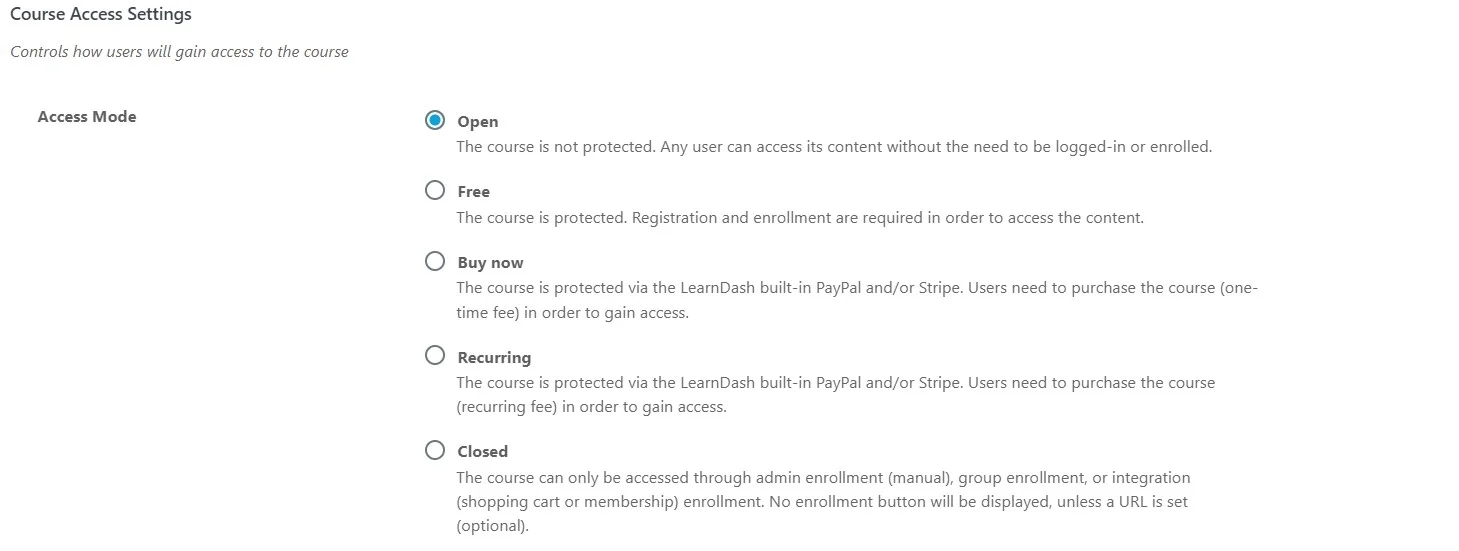
Price. $259, $399 and $599 a year for Essentials, Pro and Elite on the LearnDash pricing page. No introductory discount is advertised, so year two costs what year one did. The page describes each purchase as one licence with unlimited courses and unlimited learners, but it does not publish a site count for any tier, so confirm that at checkout if you run more than one site. There is a 48-hour free trial with no card required. See current LearnDash plans.
Best for. A single course business that wants one bill and no add-on shopping, and for training teams who need groups and reporting. Our longer LearnDash review goes deeper on the reporting side.

Skip it if. You want to test properly before paying. Forty-eight hours is enough to click around, nowhere near enough to build a course, record the lessons and watch a real student work through it. There is also no free core to fall back on if you let a licence lapse.
LifterLMS: free engine, paid plumbing
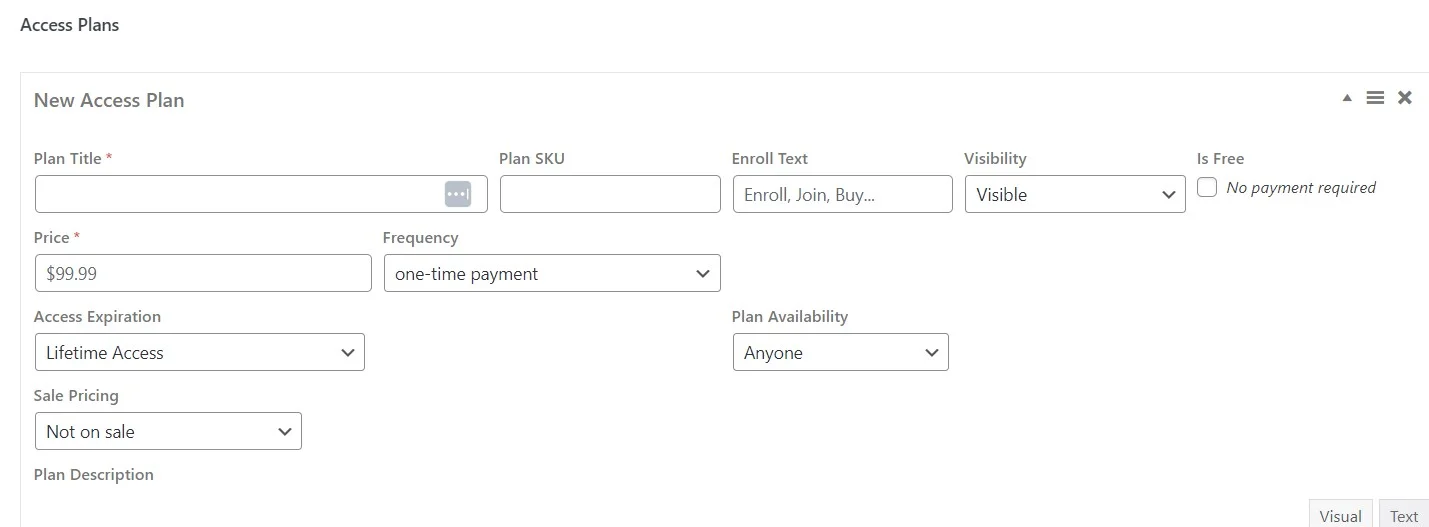
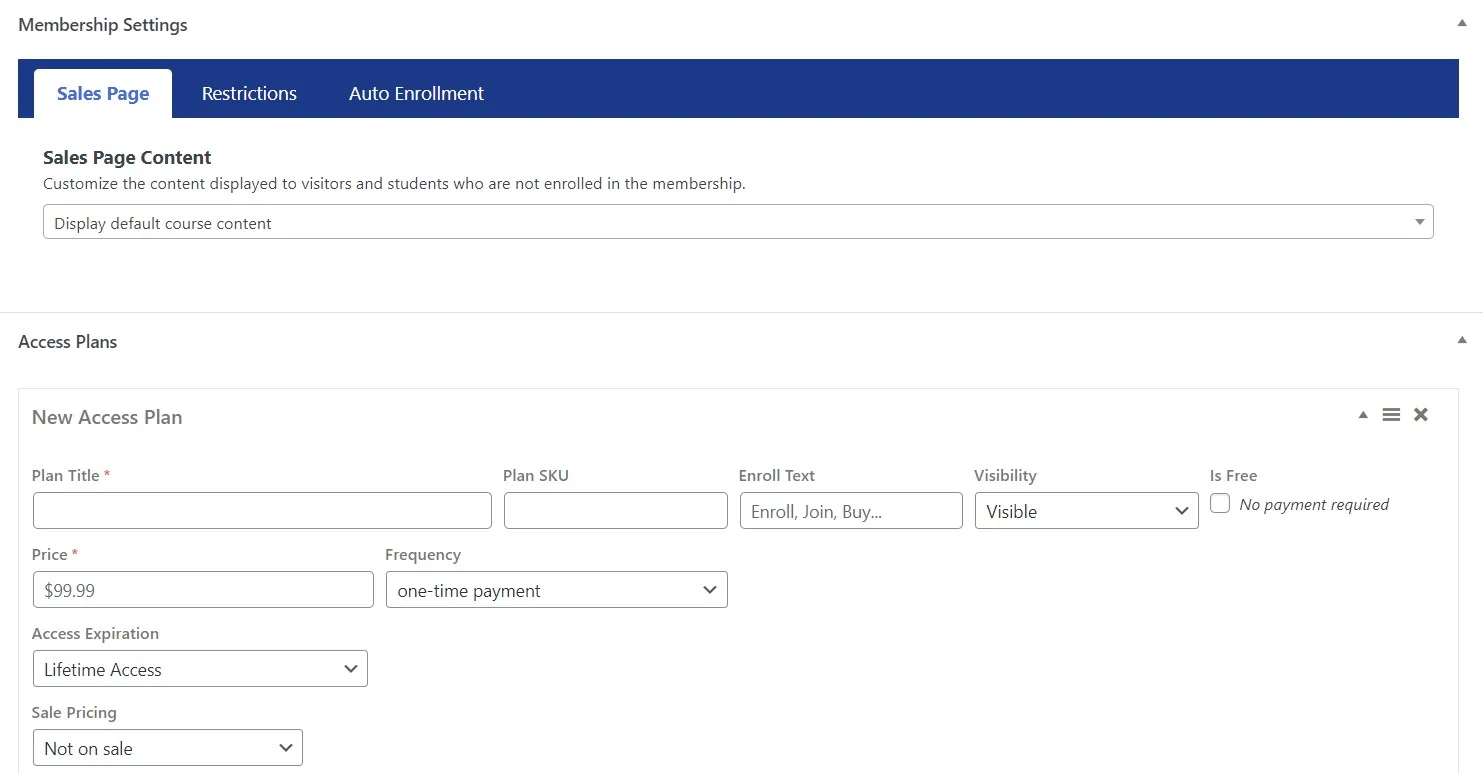
Key features. The core plugin is free on WordPress.org, where it lists 10,000+ active installs and a 4.8 star average, and it is not a crippled demo. Unlimited courses, memberships, quizzes, certificates, engagement emails and a student dashboard all ship free. Access plans are the clever bit: one course can carry several plans at once, so the same course sells at a one-off price, on a payment schedule, or free to members.
Price. Free core, then Earth at $199, Universe at $299 and Infinity at $799 for the first year with the FIRSTYEAR50 coupon shown on the LifterLMS pricing page, which also states plainly that all renewals are at full price: $398, $598 and $1,598. Site counts are published: one, five, unlimited. There is a 30-day money-back guarantee, and a $1 demo that opens every add-on for 30 days. See current LifterLMS bundles.
Best for. Validating a course idea for nothing, and for anyone running several sites: Universe covers five active sites, which is $119.60 per site per year at the renewal price. Our LifterLMS review covers the add-on catalogue in detail.
Skip it if. You want a fixed bill. The free core records manual payments only, so unattended Stripe or PayPal checkout means a bundle, or $149 a year for the Stripe add-on on its own.
The two course builders are shaped differently
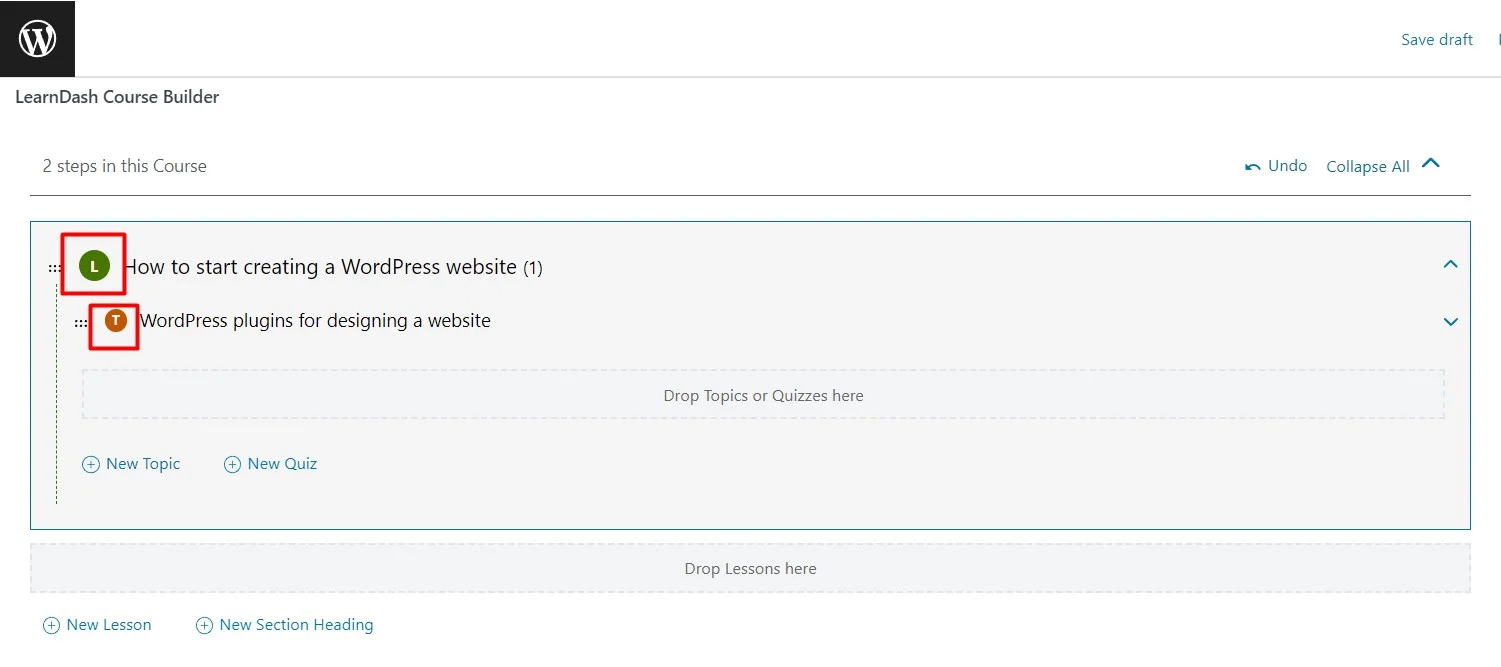
LearnDash gives you a course containing lessons, with topics nested inside lessons, and quizzes that can hang off a course, a lesson or a topic. Three levels, which suits material that genuinely has sub-sections. The builder is a compact outline panel: type a lesson name, hit enter, keep going.
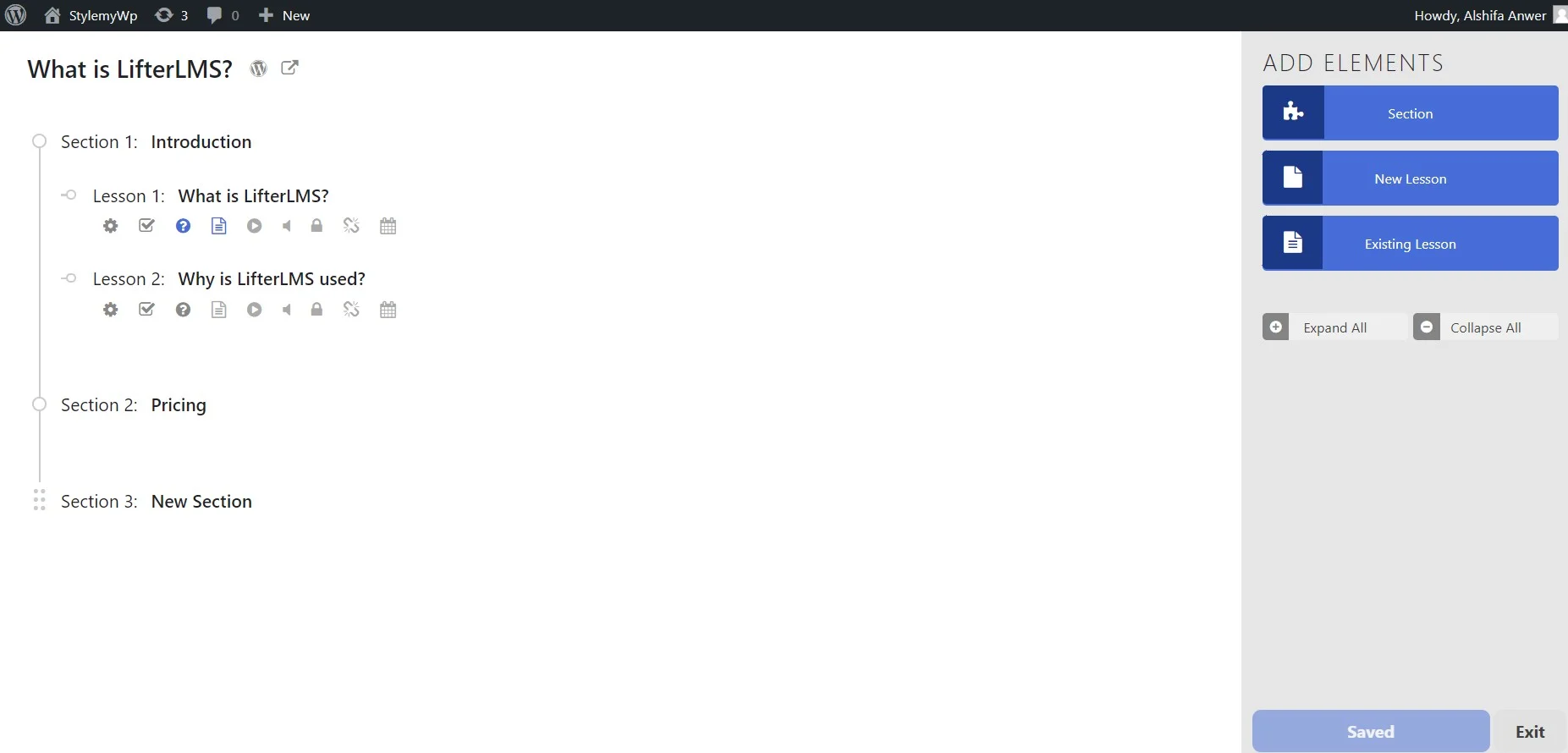
LifterLMS uses sections and lessons. Two levels, and the builder feels closer to sketching an outline in a notes app. Lesson titles and short descriptions are editable in place instead of bouncing you into a separate editor for every item, which is the faster loop when you are dumping in twenty lesson names at once.
Which is better depends on your material, not on the software. Deep, modular curricula fit LearnDash’s extra level. Linear cohort courses fit LifterLMS. Both output ordinary WordPress content, so either works with whatever you already design with; if that is still undecided, start with our comparison of visual page builders.
Quizzes and assessment
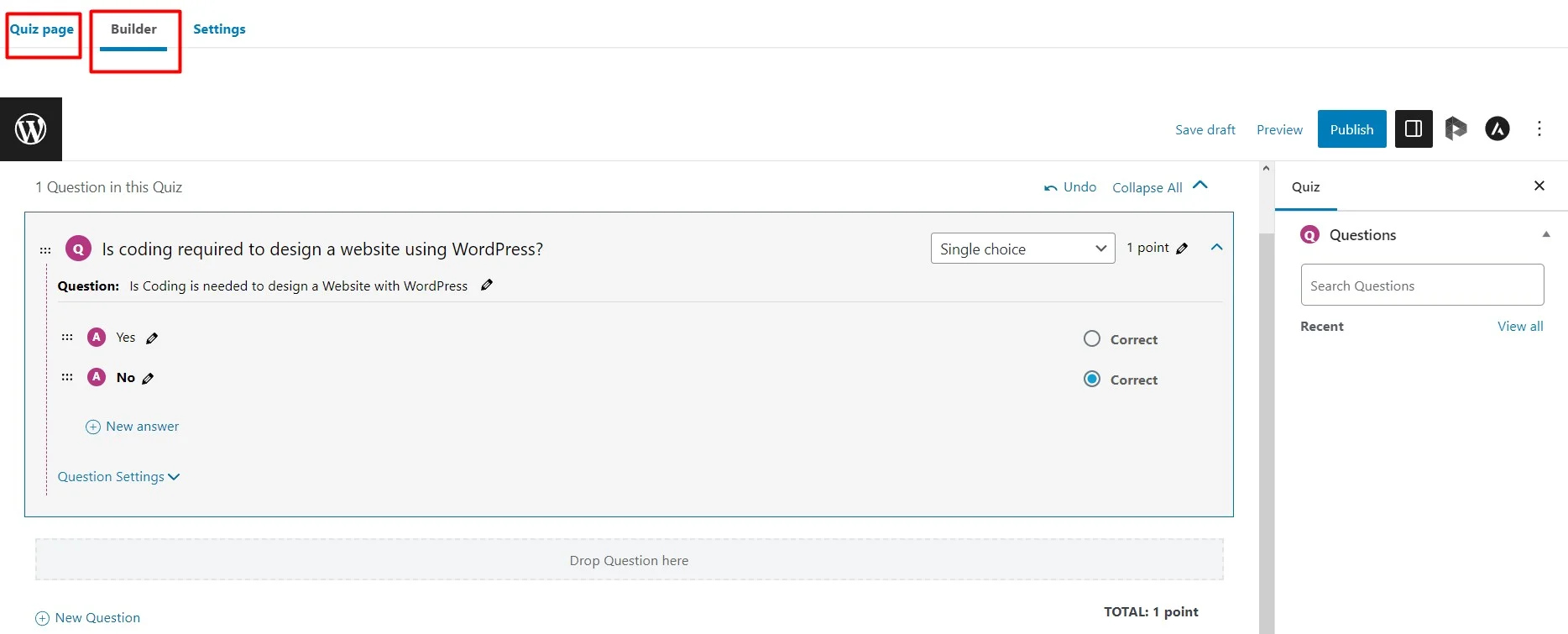
LearnDash has the more configurable quiz builder. Question types, points per question, time limits, retake rules and pass marks sit in one long settings stack, and Pro adds weighted grading and custom report cards. The trade-off is density: that settings screen is a lot on day one, and wiring a quiz to the right lesson is the step people get wrong first time.
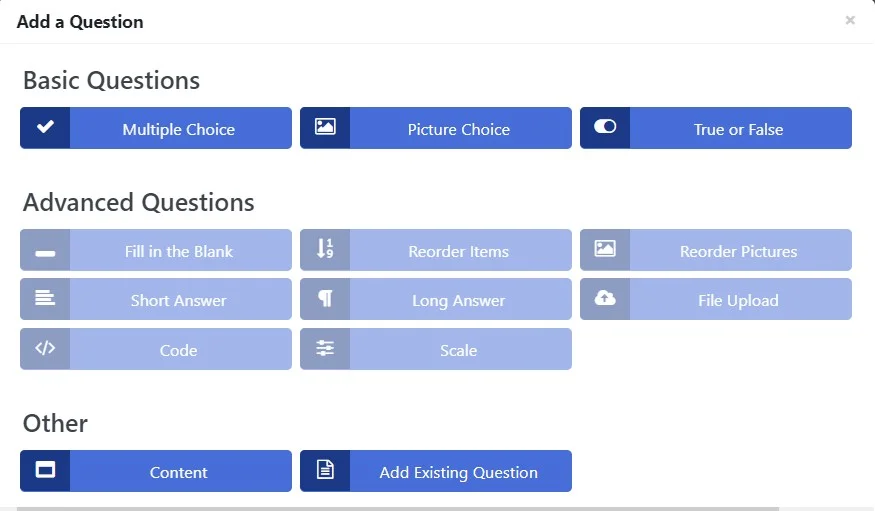
LifterLMS attaches quizzes to a lesson and keeps the options short: question types, passing percentage, attempt limits, time limit. Quicker to set up, harder to misconfigure. If your assessments are really certificates-on-completion rather than graded exams, that shorter list is a feature rather than a gap.
Taking money

LearnDash includes Stripe and PayPal, and hands off to WooCommerce if you want carts, coupons and tax handling from a store you already run. That route earns its keep when courses are one product line among several; our list of WooCommerce plugins worth installing covers the supporting cast.
LifterLMS sells through its own access plans out of the box, but the free core records manual payments, meaning you mark each order paid yourself. Fine for a beta cohort of ten, unworkable at a hundred, which is where a bundle stops being optional. If memberships rather than courses are the actual business, weigh both against dedicated WordPress membership plugins first, and our notes on monetising a WordPress site cover the surrounding decisions.
What most LearnDash vs LifterLMS comparisons get wrong
They quote dead prices. LearnDash’s own domain now redirects to Liquid Web’s product page, and the tiers there are Essentials, Pro and Elite at $259, $399 and $599. Any comparison still listing Basic, Plus and Pro, or a per-site tier ladder, is describing a product you cannot buy today.
They call the free version a trial. LifterLMS core is not a fourteen-day tease. You can run a whole course site on it indefinitely and plenty of people do. What you cannot do is take an automated card payment. Frame it as free-until-you-sell rather than free-forever and the comparison gets honest.
Nobody prices the gateway. The gap between LearnDash Essentials at $259 and LifterLMS core at nothing shrinks the moment you need Stripe running unattended, because that is a $149 add-on or a $199 bundle.
Nobody mentions hosting. Course sites run on logged-in traffic, and logged-in traffic skips most page caching. A budget shared plan that serves a blog beautifully can crawl once thirty students open a video lesson at the same time. Sort out hosting that suits a membership site before arguing over a $140 difference in licence price, and our guide to speeding up a WordPress site covers what caching cannot fix.
Switching later is expensive. Both plugins store courses, lessons, quizzes and student progress in their own custom post types and database tables. Moving means a paid migration tool or a manual rebuild plus re-enrolling everyone. Take a full backup before you test either one, and our backup plugin picks will handle that.
Which one should you pick
- You have not sold a course yet. LifterLMS core, free. Take payment by hand for the first cohort, then buy Earth once the money is real.
- One course business, one site, selling from day one. LearnDash Essentials at $259. It is the cheapest paid licence in the table that does not reprice at renewal.
- You want reporting and AI-assisted course drafting. LearnDash Pro at $399, which is where ProPanel starts.
- You build course sites for clients. LifterLMS Universe covers five active sites for $598 at renewal. Infinity covers unlimited sites but renews at $1,598.
- You sell seats to companies. LearnDash Elite at $599, for groups, the instructor role and seat sales.
Frequently Asked Questions
Is LifterLMS really free?
Yes. The core plugin on WordPress.org is free and open source, with unlimited courses, memberships and students. The limit is money: the free core ships a manual payment gateway only, so automated Stripe or PayPal checkout means buying a bundle or the individual add-on.
Does LearnDash have a free version?
No. LearnDash has no free tier. The vendor page offers a 48-hour trial with no card required, and paid plans start at $259 a year for Essentials. Budget for a licence from day one, and remember there is no free core to fall back on if you cancel.
Which is cheaper over two years?
LearnDash Essentials, by $79. Two years of Essentials is $518 at $259 a year with no repricing. LifterLMS Earth is $199 in year one on the FIRSTYEAR50 coupon and $398 after, so $597. LifterLMS is only cheaper if you stop after twelve months.
How many sites does one licence cover?
LifterLMS is explicit: Earth covers 1 active site, Universe 5, Infinity unlimited. LearnDash is not. Its pricing page says one licence, unlimited courses, unlimited learners, without naming a site count for Essentials, Pro or Elite, so confirm the site allowance at checkout.
Can you move courses from LearnDash to LifterLMS later?
Not cleanly. Both store courses, lessons and quizzes in their own custom post types and database tables, so a migration means a paid tool or manual rebuilding, plus re-enrolling students. Treat the choice as sticky and take a full backup before you experiment with either.
Does either plugin need coding?
No. Both build courses with a drag-and-drop outline builder inside WordPress and ship their own front-end pages. You will touch CSS only if you want the course pages to match a custom theme, and that is a design job rather than a plugin limitation.
Is there a refund if it does not fit?
LifterLMS publishes a 30-day, 100 percent money-back guarantee on its pricing page. LearnDash advertises a 48-hour free trial with no card instead, and its pricing page states plans renew annually and can be cancelled any time. Check refund terms at checkout before you buy.
Which one is better for selling memberships?
LearnDash on paper, because MemberDash is bundled into every plan, so memberships cost nothing extra. LifterLMS also does memberships in the free core, but automated recurring billing needs a gateway add-on. If memberships are the whole business, compare both against dedicated membership plugins first.
The verdict
LearnDash takes it. For most people building one course site and charging for access, LearnDash Pro at $399 a year is the better buy: builder, quizzes, reporting and memberships arrive together, the number does not move at renewal, and there is no add-on shopping trip six weeks in. Essentials at $259 is the honest starting point if you can live without ProPanel.
LifterLMS wins one argument outright, and it is a big one. Nothing else here lets you build and run a real course site for nothing while you find out whether anyone wants it. Start on the free core, sell the first cohort by hand, then buy a bundle with money the course earned. Just go in knowing the renewal doubles.


[…] and let it handle access. Start with our WordPress LMS plugins comparison, or go straight to LearnDash versus LifterLMS if you have narrowed it to those […]