A WordPress MCP server is the plugin that lets Claude, ChatGPT or Cursor sign in to your site and do the work: draft posts, rebuild an Elementor section, fix Rank Math fields. WordPress.org lists dozens, and the feature tables look alike. The real difference is what you hand over. We edit this site through one, run another elsewhere, and installed six more on a clean test site. Below: the eight worth knowing, what each costs after year one, and the setting that decides how much damage a bad prompt can do.
⚡ Quick verdict
- Best overall (free): Easy MCP AI. Self-hosted, OAuth sign-in, an audit log and a before-and-after change history.
- Best safety net for a live site: Royal MCP. Dry runs, drafts by default and a 72-hour undo token on destructive writes.
- Easiest setup: WPVibe. One-click connect and approvals in the chat. The catch is a hosted relay and a free cap of 100 actions a day.
- Best for Elementor sites: Elementor MCP. Built into Elementor 4.3+, and the free plugin is enough to connect.
- Best for developers on staging: Novamira. It runs PHP and WP-CLI, so keep it off any site you can’t restore.
- Our call: start with Easy MCP AI or Royal MCP on a staging copy, signed in as a dedicated low-role user. Add a PHP-capable server only where a developer is watching.
How we make money: the Elementor link in this post is an affiliate link. If you buy through it we may earn a commission at no extra cost to you. None of the MCP plugin links are affiliate links, and none of this changes which plugin we recommend. Pricing checked 24 October 2026.
What is a WordPress MCP server?
It’s a plugin that publishes your site’s actions as tools an AI client can call through the Model Context Protocol (MCP): list posts, upload an image, edit a page, read SEO fields. The AI signs in as a real WordPress user, so it can do exactly what that user’s role allows, and nothing more.
WordPress core gets you halfway. Version 6.9 added the Abilities API, a registry where plugins declare what they can do, and a fresh 7.1.3 install has a Settings → Connectors screen for AI providers. None of that speaks MCP. You still need a plugin to serve those abilities to Claude or ChatGPT, and the eight below take three very different approaches:
| Design | Plugins | What a bad prompt can do |
|---|---|---|
| Typed tools, direct connection | Easy MCP AI, Royal MCP, Elementor MCP, AI Engine, MCP Adapter, miniOrange | Whatever those tools allow, as the connected user |
| Typed tools through a hosted relay | WPVibe | The same, and every call passes through the vendor’s servers |
| PHP and WP-CLI execution | Novamira | Anything an administrator’s code can do on that server |
The 8 best WordPress MCP plugins at a glance
| Plugin | Best for | Free version | Paid from | Connection | Installs |
|---|---|---|---|---|---|
| Easy MCP AI | Most sites | Full plugin, 280+ tools | No paid tier | Direct | 20,000+ |
| Royal MCP | Live and client sites | 266 tools, 72-hour undo | $79/yr, 1 site (founder rate, same at renewal) | Direct | 10,000+ |
| WPVibe | One-click setup | Plugin free, 100 actions a day | $99/yr (rate locked while subscribed) | Hosted relay | 90,000+ |
| Elementor MCP | Elementor builders | In free Elementor 4.3+ | Elementor Pro from $60/yr adds Theme Builder and forms | Direct | Ships with Elementor |
| AI Engine | Chatbot plus MCP | 130+ MCP tools | $69/yr, 1 site (auto-renews) | Direct | 90,000+ |
| Novamira | Developers on staging | Full PHP and WP-CLI access | Pro from €69/yr | Direct | Not on WordPress.org |
| MCP Adapter | Developers and plugin authors | Free | None | Direct | 50,000+ |
| miniOrange Secure MCP | Per-role control for teams | Free plan | From $79/yr, early-bird rate | Direct | 7,000+ |
How we picked
We didn’t rank these from feature pages.
- Two run on our own sites. Novamira Pro on stylemywp.com and Easy MCP AI on another WordPress 7.1 site, both connected to Claude.
- Six more went onto a clean test site (WordPress 7.1.3, PHP 8.3) in October 2026, where we checked defaults, setup screens and what’s switched on out of the box. Every screenshot below comes from those clean test installs. We didn’t connect each of those to an AI client, so how they behave in use comes from their own documentation and changelogs, and we say so where it matters.
- Every price comes from the vendor’s own pricing page and every install count from WordPress.org, checked on 24 October 2026.
- We favoured plugins whose main job is the MCP server. AI suites that only mention MCP in passing didn’t make the list. AI Engine did, because its MCP server is a real, free module of its own.
What we found on our own sites
Two findings from our own installs say more than any feature table.
234 abilities, three tools
stylemywp.com runs 25 active plugins on WordPress 7.1.3. These register WordPress abilities: Novamira with its Pro add-on (139), Secure Custom Fields (48), Rank Math (29), OttoKit (8), the WordPress AI plugin (6) and WP Mail SMTP (1), plus 3 from core. That’s 234 abilities.
Our AI client doesn’t see 234 tools, though. It sees three: discover abilities, get ability info and execute ability. That’s the layered design the official MCP Adapter uses, and it keeps the tool list short however many plugins you add. Servers that publish every action as its own tool hand your client a much longer list, which is why the good ones let you switch whole groups off.
It also means plugins you already run may be MCP-ready. Rank Math’s 29 abilities include site audits, link reports and post SEO meta (more in our Rank Math review), and Secure Custom Fields exposes field groups and post types, which matters if you lean on the custom field plugins we cover elsewhere.
The warnings weren’t about features
On the other site, Easy MCP AI’s built-in diagnostics ran 53 checks: 48 passed, nothing failed, and two slower checks hadn’t been run. The three warnings are the useful part:
- The .htaccess rule that hands the Authorization header to PHP was missing, so valid tokens can look invalid. Re-saving Settings → Permalinks puts it back.
- LiteSpeed Cache was caching the plugin’s endpoints, which can make a connection work once and then fail, or keep working after you revoke a token.
- Secure Custom Fields publishes five abilities whose tool descriptions Easy MCP AI says it “cannot make safe”. Some AI clients reject the whole tool list when one entry is invalid, so one plugin can hide every tool at once.
None of that shows up in a vendor’s feature table, and all of it decides whether your setup still works next week.
1. Easy MCP AI — best free all-rounder
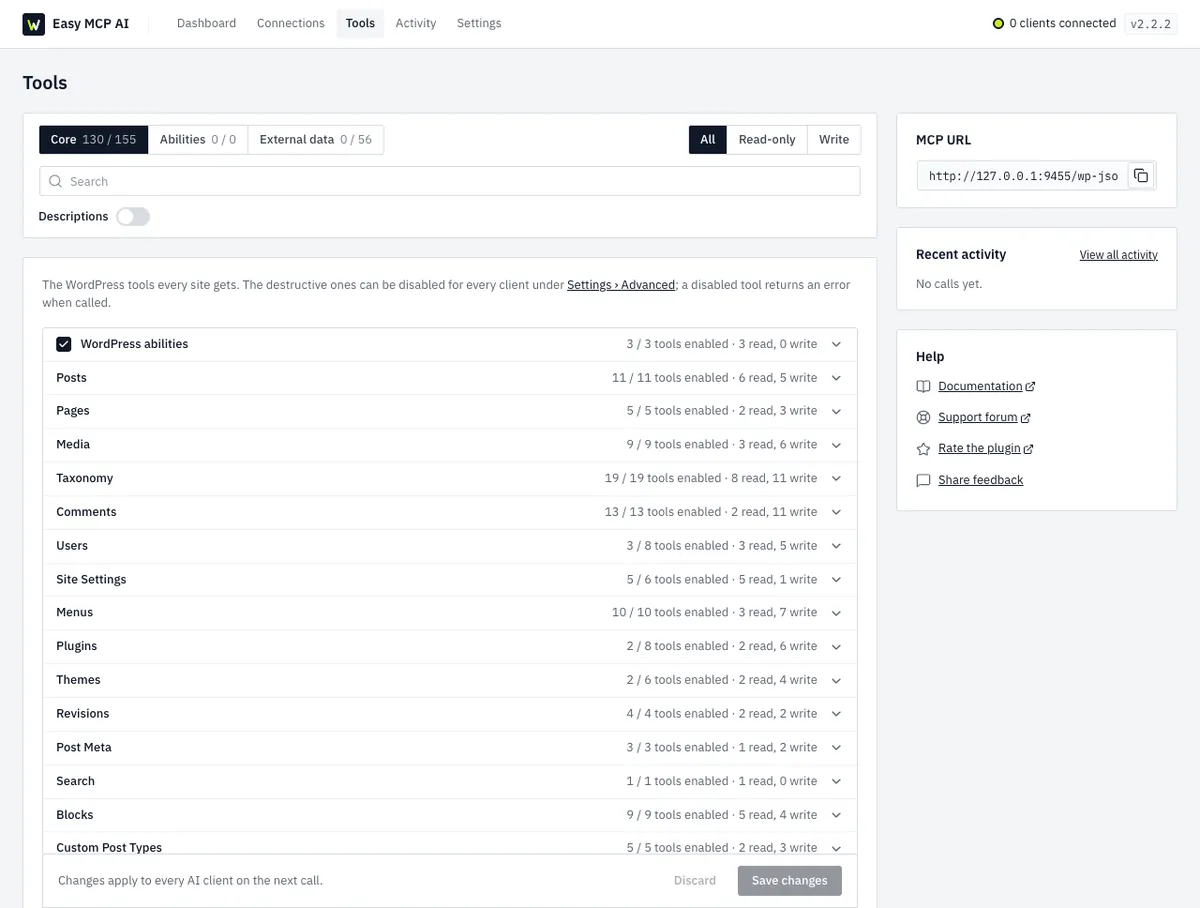
Easy MCP AI runs the MCP server inside your own WordPress: no relay, no vendor account, no usage fee. It’s made by Themeisle, and it’s the one we run on our second site, connected to Claude over OAuth. Setup is a client picker (18 clients, from Claude.ai and ChatGPT to Cursor and Codex), a consent screen and an Approve button.
Key features
- OAuth 2.1 sign-in with a consent screen where you choose what the AI may read or change, plus hashed API tokens for clients that can’t do OAuth.
- 280+ tools: 130+ for core WordPress, 90+ for WooCommerce, ACF, The Events Calendar, BuddyPress and the main SEO plugins, and 56 for Google Analytics, Search Console, Semrush, SE Ranking, DataForSEO and Ahrefs, using your own API keys.
- An Audit Log of every call, refused ones included (kept 30 days by default), and a Change History of before-and-after snapshots you can compare.
- A rate limit of 60 calls a minute per token by default, and an optional IP allowlist.
- It doubles as an Abilities API adapter: tick the abilities other plugins register and they become tools.
Price: free, with all 280+ tools in the WordPress.org version. We found no paid tier. The SEO data tools bill through your own Semrush, Ahrefs or Google accounts.
- Best for: most site owners who want one self-hosted server for content, WooCommerce and SEO work in the same chat.
- Skip it if: you want undo on every destructive write (that’s Royal MCP), or you only need Elementor page building.
⚠️ The catch: the defaults are generous. On a fresh install 130 of 155 core tools are on, including writes for posts, pages, media, comments and menus, while the Users, Plugins and Themes groups start with most of their tools off. Trim the Tools screen before you connect. After a client connects, the plugin also downloads signed skills from skills.easymcpai.com once a day; add define( 'EASY_MCP_AI_SKILLS_SYNC', false ); to wp-config.php to stop that.
2. Royal MCP — best safety net for a live site
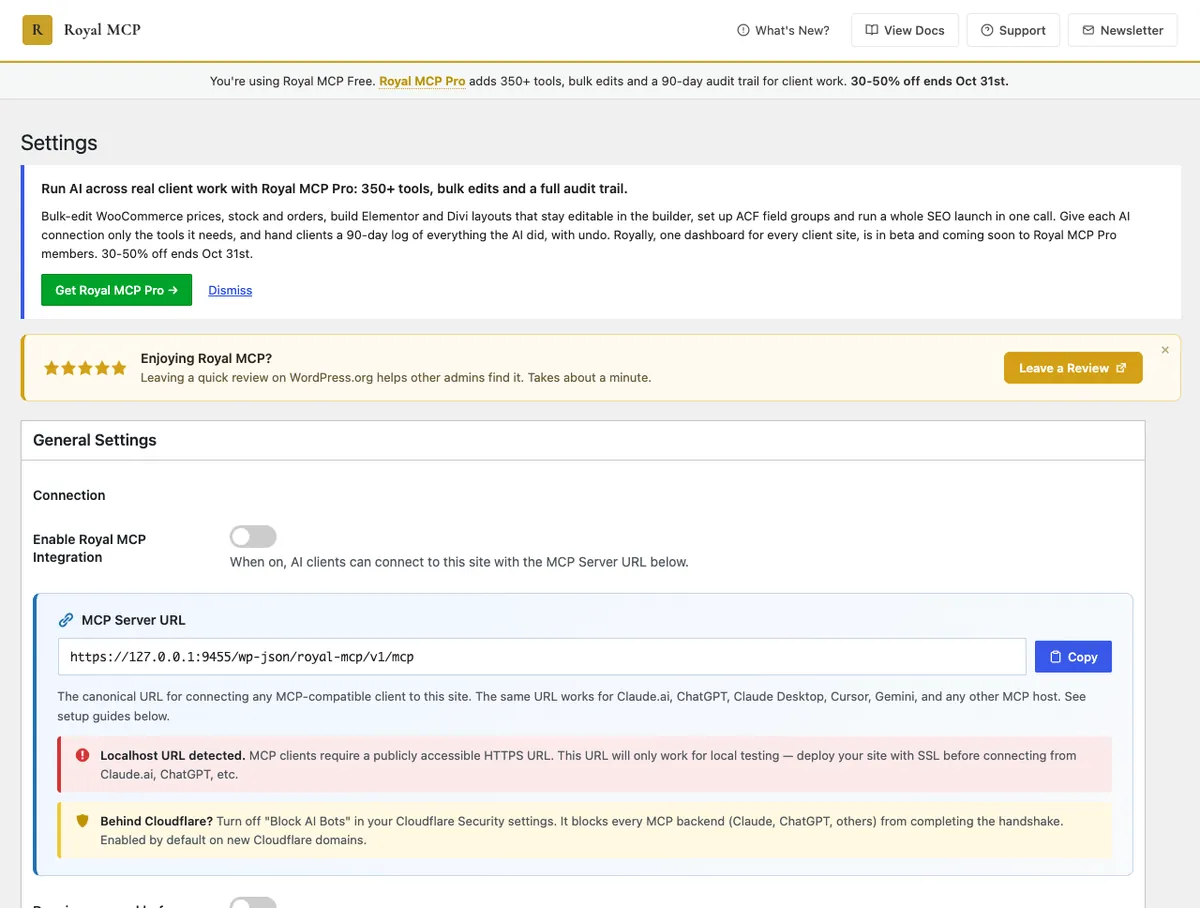
Royal MCP, from Royal Plugins, is built around getting things back. It ships 266 tools: 109 for core WordPress and 157 that load when a matching plugin is active, from WooCommerce, Elementor, Divi and ACF to Yoast, UpdraftPlus, WPForms, Wordfence and LiteSpeed Cache. It also detects Elementor’s own MCP and leaves new layouts to it.
Key features
- The server starts switched off; you turn it on under Royal MCP → Settings.
- OAuth 2.0 with PKCE and dynamic client registration for Claude and ChatGPT, or API keys rate-limited to 60 requests a minute per IP.
- Dry runs for high-impact writes like site options and permalinks, showing the current and proposed values before anything commits.
- A snapshot before every destructive write, returned as a 72-hour undo token. New posts and pages start as drafts.
- API keys, passwords and licence keys in plugin settings are redacted before they leave your server, and option writes are off by default.
Price: free on WordPress.org. Royal MCP Pro adds 100+ Pro tools, bulk edits, a 90-day audit trail and one-click undo from wp-admin. It’s on founder pricing: $79/year for 1 site, $249/year for 5 and $750/year for 100 (listed at $999 regular). Royal says the rate you check out at is the rate you renew at, the founder ladder closes in early November 2026, and there’s a 30-day refund.
- Best for: live sites and client sites, and anyone who wants a way back from a bad prompt.
- Skip it if: you want a quiet dashboard. The free version promotes Pro on its own screens, in a first-run What’s New popup and, on our test site, in a banner across wp-admin.
⚠️ The catch: free undo isn’t a button. The Recent Changes screen lists the last 72 hours of AI writes, but the undo itself is run by the AI client, using the token it was given. Close that chat and you can review changes but not revert them from the admin. One-click undo in wp-admin is a Pro feature.
3. WPVibe — easiest setup, if you accept a relay
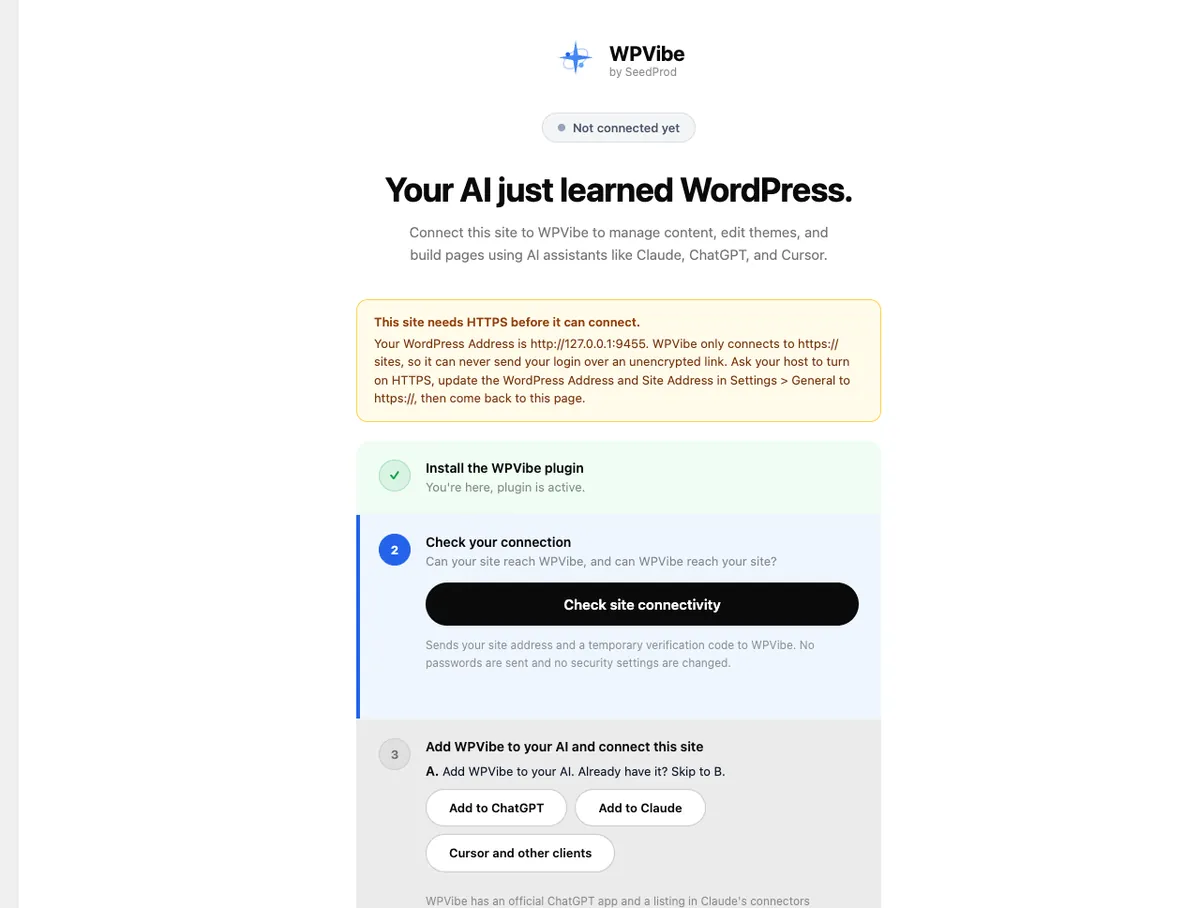
WPVibe is SeedProd’s MCP server, and the only plugin here built around a hosted relay. Your AI client talks to WPVibe’s servers, which store your site’s credentials (encrypted with AES-256-GCM, on Cloudflare-hosted infrastructure) and pass each call on to your REST API. In exchange, setup is about as short as it gets: install, authorize from wp-admin, add one URL to Claude or ChatGPT.
Key features
- An approval panel in the chat for destructive actions such as deleting users, database writes or uninstalling plugins, with a dry-run preview, plus an append-only Approval Log in wp-admin.
- Posts default to draft, deletes go to trash, and theme edits happen in a sandboxed draft theme with a preview URL.
- WP-CLI-style commands emulated in PHP behind an allowlist, so they work on shared hosting with no SSH.
- Support for page builders like Elementor, Bricks, Breakdance, Beaver Builder and Divi through each builder’s own save pipeline, per WPVibe’s listing.
- Unlimited sites on every plan, free included, and a white-label mode for agencies at no extra cost.
Price: the plugin is free, and the WPVibe service has a free plan with 100 tool calls a day, counted over a rolling 24 hours across every site on your account. Paid plans are $99/year (500 a day), $299 (2,000), $599 (5,000) and $899 (10,000). WPVibe says your rate stays the same for as long as you stay subscribed, and first-time purchases get a 14-day refund.
- Best for: non-technical owners and agencies who want the fewest steps and a visible approval trail.
- Skip it if: you don’t want a third party in the request path, or one busy afternoon of edits would blow through 100 actions.
⚠️ The catch: every tool call and every response travels through WPVibe’s servers. Its FAQ says your content stays on your server, which is true of where it’s stored, not of where it travels. The daily allowance is also per account, so ten client sites share one cap.
4. Elementor MCP — best for Elementor sites
Elementor shipped its own MCP server in version 4.3.0 on 22 September 2026. Because it’s Elementor’s own, it builds with the same Atomic elements, global classes and variables the editor uses, rather than approximating them from outside. According to Elementor’s help center, an agent can read page structures, build Atomic elements, manage global classes and variables, connect dynamic data and update templates.
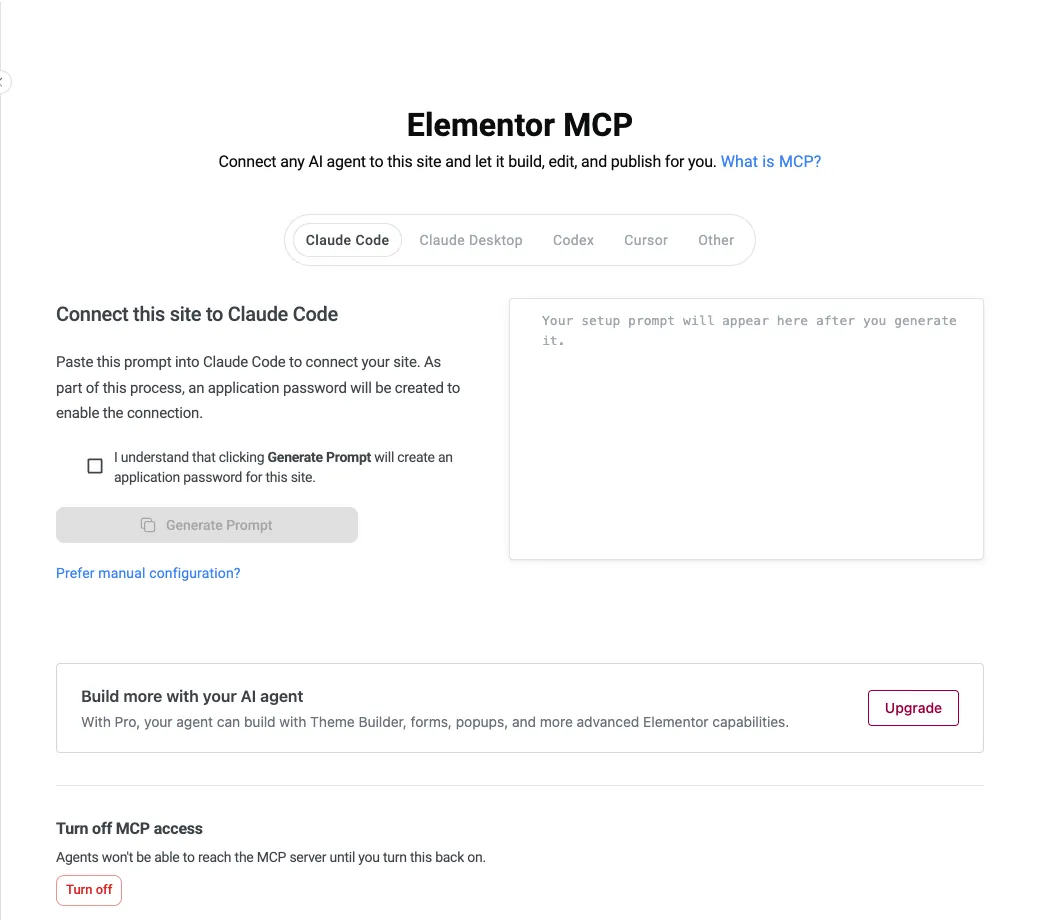
That help page lists Elementor Pro 4.3+ as a requirement. On our test site, free Elementor 4.3.5 on its own offered the full connection flow, and the plugin ships its own copy of the MCP Adapter, so there’s nothing else to install. Pro adds Theme Builder, forms and popups to what the agent can build.
Key features
- Turn it on under Elementor → Elementor MCP, pick Claude Code, Claude Desktop, Codex, Cursor or Other, and paste the generated prompt into that client.
- One application password per agent, which you can rename or revoke, and one switch that cuts off every agent at once.
- The agent works with the role of the user who connected it, so an Editor’s agent can’t change site settings.
- It works on your global classes and variables, so generated sections match the rest of your design system.
Price: included in Elementor 4.3 and later, free plugin included. Elementor Pro starts at $60/year for one site on the Essential plan, which has Theme Builder and forms but no Popup Builder; popups start at Advanced Solo, $84/year. Both are billed annually, and the pricing page shows no separate renewal rate for them.
- Best for: anyone building with Elementor’s V4 Atomic Editor. Still choosing a builder? Start with our Elementor review.
- Skip it if: your pages are built from classic V3 widgets. In 4.3.5’s code, 17 of the building abilities refuse to run until the Atomic Editor is switched on in Elementor → Settings.
⚠️ The catch: it’s a month old and still settling. The 4.3.3 and 4.3.4 releases fixed MCP style values that weren’t applied and element settings that could be lost when an agent updated a page. Back up before an agent rewrites a page, and keep a general server for posts, SEO and everything outside the builder.
5. AI Engine — best if you want AI inside WordPress too
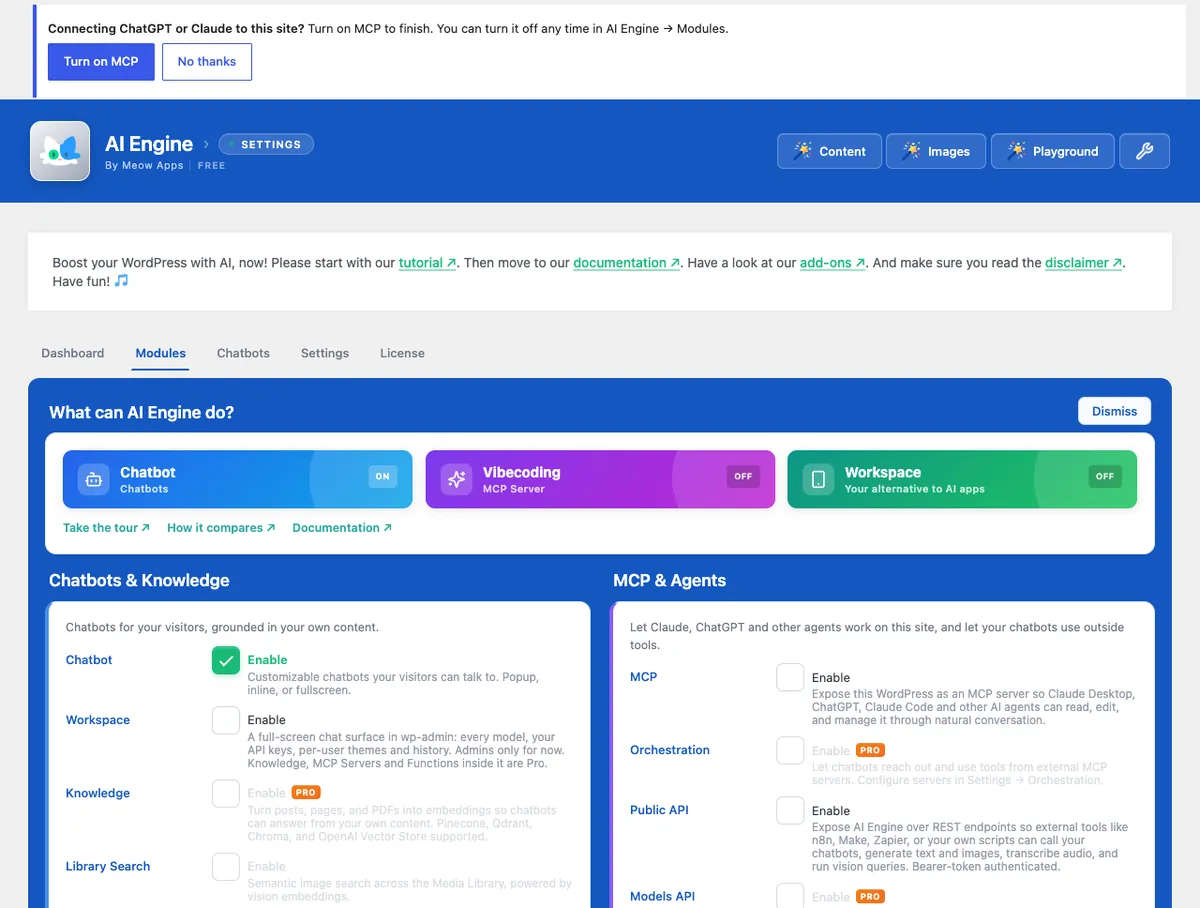
AI Engine by Jordy Meow (Meow Apps) is the veteran here, on WordPress.org since 2022, and MCP is one module in a much bigger plugin: chatbots, content and image tools, AI forms and a Workspace chat inside wp-admin. The MCP server itself is free and connects directly by default. An optional Meow Apps gateway can add your site to ChatGPT or Claude for you, if you’d rather not do the setup yourself.
Key features
- 130+ free MCP tools for posts, pages, media, comments, users, taxonomies, block patterns and editor notes, plus image generation and vision.
- OAuth for desktop clients: paste the MCP URL, sign in to WordPress, approve.
- Editor Access lets editors connect, limited to content they can already edit. Settings, users, plugins, themes and deleting stay with administrators.
- Tool sets you switch on one by one, and abilities from other plugins can join with their own permission checks.
- No arbitrary code execution. The optional AI Engine YOLO companion that adds it is GitHub-only and switches itself off on production.
Price: the MCP server is free. AI Engine Pro adds plugin, theme, database, WooCommerce, Polylang and WPML tools for $69/year (1 site), $99 (5 sites) or $179 (20 sites), or lifetime from $499 (5 sites). Yearly licences renew automatically, and the pricing page lists no different renewal price. 14-day refund.
- Best for: sites that want a visitor chatbot and an MCP server from one vendor.
- Skip it if: MCP is all you want. You’d install a large AI suite for one module, and AI Engine’s own features need an API key from OpenAI, Anthropic or another provider.
⚠️ The catch: the free tools stop at content. Anything touching plugins, themes, the database or WooCommerce is Pro. Pro’s update check also reports whether MCP was used in the last 30 days, a yes or no per the plugin’s listing.
6. Novamira — most powerful, for development and staging
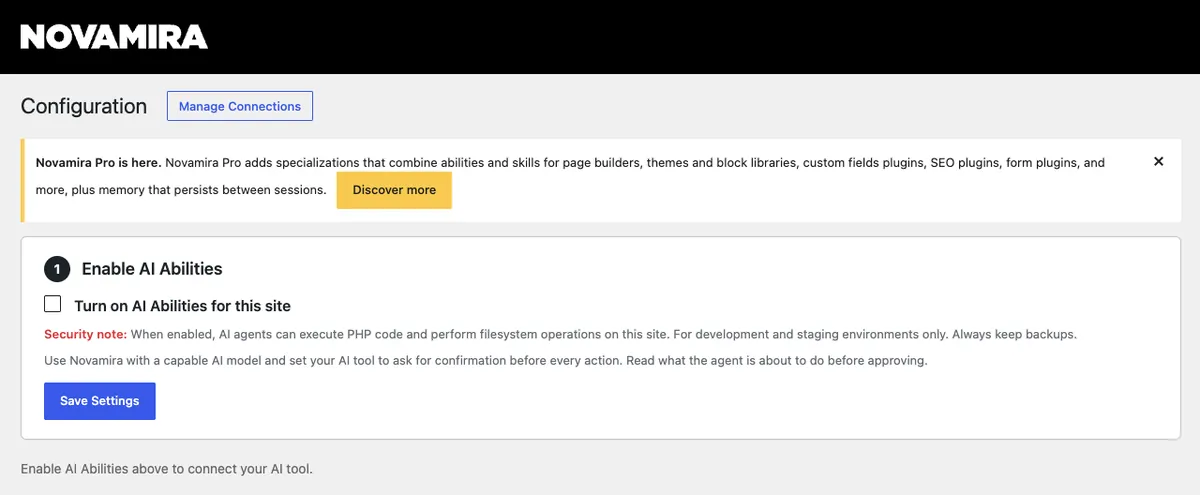
Novamira, from Dynamic.ooo (the team behind Dynamic Content for Elementor), skips the tool catalogue. The agent runs PHP and WP-CLI inside your WordPress with $wpdb, your plugins and your theme loaded, and it can read and write files and query the database. This site runs Novamira Pro: it’s how we edit posts, ACF fields and Rank Math metadata from Claude Code. Its GitHub repository has 741 stars, and version 1.12.12 shipped on 21 October 2026.
Novamira is blunt about the risk. The plugin header says “For development and staging environments only”, and the README adds “With backups. Always.” We accept that trade-off on this site. Most readers shouldn’t.
Key features
- PHP execution with the full WordPress context, WP-CLI in the foreground or background, and filesystem access with a recoverable sandbox for new PHP files.
- Native Block Editor workflows, media uploads, reusable skills and design guidance.
- OAuth or Application Password sign-in, plus Novamira CLI for terminal agents like Claude Code, Codex CLI and Gemini CLI.
- Pro adds 56 specialisations (Elementor, Bricks, Divi 5, Blocksy, ACF, Rank Math, WooCommerce and more), memory between sessions, Read Mode, and a Ghost Mode that hides Novamira from other administrators.
Price: free and open source (AGPL-3.0), downloaded from GitHub or novamira.ai rather than WordPress.org. Novamira Pro starts at €69/year and is sold through dynamic.ooo; check the renewal terms at checkout.
- Best for: developers on a staging copy, with backups, who want the agent to fix the problem rather than describe it.
- Skip it if: the site is live and you couldn’t restore it in minutes.
⚠️ The catch: on a typed-tool server, a leaked credential lets someone edit content. On Novamira it lets them run code. Read Mode (Pro) removes the write abilities, but Novamira’s own Read Mode screen says it “is not a security feature”: the agent still connects with an administrator’s credential and can read everything an administrator can.
7. MCP Adapter — the official foundation for developers
The MCP Adapter is the WordPress AI team’s own plugin, on WordPress.org since 2 October 2026 and already on 50,000+ sites. It’s plumbing rather than a product: it takes the abilities that core and your plugins register through the Abilities API and serves them to MCP clients over HTTP or STDIO. It adds no admin screen and no AI features of its own; on our test install there was nothing to click. WordPress introduced it on its developer blog in February 2026.
Connecting a client takes an Application Password and a few lines of config. This is the pattern we use for our own sites, with placeholder values:
{
  "mcpServers": {
    "my-site": {
      "command": "npx",
      "args": ["-y", "@automattic/mcp-wordpress-remote@latest"],
      "env": {
        "WP_API_URL": "https://example.com/wp-json/mcp/mcp-adapter-default-server",
        "WP_API_USERNAME": "ai-editor",
        "WP_API_PASSWORD": "xxxx xxxx xxxx xxxx xxxx xxxx"
      }
    }
  }
}
Keep that file out of any shared folder or repository. The password in it carries the full role of the user it belongs to.
Key features
- Opt-in exposure: only abilities marked public are reachable, and permission checks run as the connected user.
- The default server publishes three tools (discover, get info, execute) instead of one per ability, which keeps tool lists short.
- Supports MCP revisions 2025-11-25 and 2026-07-28; older clients are served through the 2025-11-25 schema.
- Multiple MCP servers per site, each with its own configuration.
Price: free and open source (GPL).
- Best for: developers and plugin authors, and sites whose plugins already register abilities, like Rank Math, Secure Custom Fields and WooCommerce.
- Skip it if: you want ready-made tools. With no extra abilities registered, it exposes WordPress core’s three read-only abilities and little else.
⚠️ The catch: version 0.7.0 (2 October 2026) deprecated bundling the adapter inside other plugins, yet Elementor 4.3.5 still ships its own copy. If you run both, keep the standalone plugin updated: 0.7.1 changed how it loads so a newer installed copy can be picked over an older bundled one.
8. miniOrange Secure MCP Server — best for role-based control

miniOrange is better known for single sign-on and two-factor plugins, and its MCP server is built the same way: identity first. You register each agent, grant abilities per WordPress role, and everything else stays hidden. It’s been on WordPress.org since June 2026 and has 7,000+ installs.
Key features
- An Agent Registry where you decide, per WordPress role, exactly which tools an AI agent can use.
- Self-hosted OAuth 2.1 with PKCE, so the AI never sees your WordPress password.
- Governed REST access that is read-only by default for a new agent; any write needs your approval.
- A full audit log of allowed and refused calls, rate limits per client, and masking for emails, phone numbers and secrets.
- 426 tools across 26 categories, from core and WooCommerce to Rank Math, Elementor and the big form plugins.
Price: free on WordPress.org. miniOrange’s own blog quotes paid plans from $79 a year as an early-bird rate. The plugin listing doesn’t say which controls are paid.
- Best for: teams where several people and agents work on one site and someone has to prove who did what.
- Skip it if: you’re one person running one blog. The governance layer is overhead you won’t use.
⚠️ The catch: it’s young, and the free-versus-paid split isn’t documented on the listing. Ask for the feature matrix before you build a workflow around a control that turns out to be premium.
Also worth a look
- WooCommerce’s built-in MCP. WooCommerce has a native MCP integration, still labelled a developer preview, that you switch on under WooCommerce → Settings → Advanced → Features. Its abilities cover products and orders. Pair it with a general server, and see our WooCommerce plugins roundup for the rest of the store stack.
- Cowboy MCP. Free and GPL with no paid tier: typed tools with dry runs and undo instead of a PHP shell. Only 1,000+ installs so far, but one to watch.
- Enable Abilities for MCP. An add-on for the official adapter rather than a full server: it lets you switch individual abilities on or off, adds its own content abilities, and includes an OAuth server for claude.ai connectors (5,000+ installs).
- Automattic’s wordpress-mcp. Skip it. Its GitHub repository says it will be deprecated as the official MCP Adapter reaches stable releases.
What most roundups get wrong
We read the roundups that rank for this search before writing ours. Three habits keep coming up.
They’re written by vendors. Themeisle, which makes Easy MCP AI, ranks it first in its own roundup and says so, which is fair. Easy MCP AI’s site and miniOrange’s blog publish comparisons too, and one of miniOrange’s lists Royal MCP’s paid plans as “starting at $79 per month”. Royal’s own pricing page says $79 a year. Take prices from the vendor’s page, not from a rival’s table.
They treat “free” as one thing. In this list it means four different things: a free plugin with every tool (Easy MCP AI), a free plugin whose useful tools stop at content (AI Engine), a free plugin tied to a hosted service with a daily cap (WPVibe), and a free core that leans on paid licences for builder features (Elementor). Read the free column as a question, not an answer.
They skip the account. This is the setting from the intro. The plugin decides which actions exist; the WordPress account the AI signs in as decides how far they reach. An Application Password carries its user’s full role until you revoke it. Give the AI its own user with the lowest role that does the job: Editor for content work, Administrator only when it truly needs settings or plugins.
How to choose a WordPress MCP plugin
- Building pages in Elementor? Turn on Elementor MCP first, then add a general server for everything outside the builder.
- Want the fewest steps and don’t mind a relay? WPVibe.
- Working on a live or client site? Royal MCP for undo tokens, or Easy MCP AI for change history and an audit log.
- Want Search Console, GA4 or Semrush data in the same chat? Easy MCP AI.
- Also want a chatbot for visitors? AI Engine.
- A developer with a staging copy and backups? Novamira.
- Writing your own abilities, or your plugins already register them? MCP Adapter.
- Several people, several agents and an audit to pass? miniOrange.
Before you connect an AI to a live site
Whichever plugin you pick, do these first.
- Take a backup and check that it restores. Our backup plugins roundup covers the options.
- Try the plugin on a staging copy first. Most managed hosts offer one-click staging, and it’s worth weighing when you choose WordPress hosting.
- Create a dedicated WordPress user for the AI, with the lowest role that works.
- Prefer OAuth where the plugin offers it. If you use Application Passwords, keep them out of shared files and revoke unused ones under Users → Profile → Application Passwords.
- Exclude the MCP routes and the /.well-known/oauth-* paths from page caching in whichever cache plugin you run.
- Behind Cloudflare? Royal MCP’s settings screen warns that the Block AI Bots setting, which Royal says is on by default for new Cloudflare domains, stops the MCP handshake for Claude and ChatGPT. Check it before you blame the plugin.
- Switch off tool groups you won’t use, and set your AI client to ask before every write.
- Watch logins and new admin accounts with a security plugin, and read the MCP plugin’s activity log weekly for the first month.
Frequently Asked Questions
Is there an official WordPress MCP plugin?
Yes. The MCP Adapter is built by the WordPress AI team and has been on WordPress.org since October 2026. It isn’t part of WordPress core, and it only serves abilities that core or your other plugins register, so on its own it exposes very little. Pair it with plugins that register abilities.
Does WordPress 7.0 have MCP built in?
No. WordPress 6.9 added the Abilities API, and current 7.x releases add a Connectors screen for AI providers, but none of that speaks MCP. You still need the MCP Adapter or a full server plugin, unless a plugin you already run, like Elementor 4.3 or later, ships its own.
Is it safe to connect Claude or ChatGPT to a live WordPress site?
It can be, if you limit what the connection can do. Use a dedicated WordPress user with the lowest role that works, prefer OAuth, switch off tools you don’t need, keep tested backups, and keep PHP-executing servers like Novamira off production. Try everything on staging first.
Can I run two MCP plugins on the same site?
Yes, but point each AI client at one server per job. Royal MCP is designed to run next to Elementor’s and WooCommerce’s own MCP tools. Easy MCP AI’s diagnostics check for competing MCP plugins, because a client connected to the wrong endpoint looks exactly like a broken setup.
Do I need Elementor Pro for Elementor MCP?
No. On a test site running only free Elementor 4.3.5, the Elementor MCP screen offered the full connection flow, and Elementor bundles its own copy of the MCP Adapter. Pro lets the agent use Theme Builder, forms and popups, and most building tools need the Atomic Editor switched on.
Application Passwords or OAuth: which is safer for MCP?
OAuth, where the plugin supports it. You approve each client on a consent screen, tokens can expire and be revoked per client, and some plugins let you narrow what each grant can touch. An Application Password carries its user’s full role until you revoke it, and it usually sits in a config file.
Why does my MCP connection work once and then fail?
Usually caching or headers, not the plugin. Page caches can serve a stale OAuth or discovery response, some hosts strip the Authorization header before PHP sees it, and Cloudflare’s Block AI Bots setting can stop the handshake. Exclude the MCP routes from caching and check those three first.
Will the AI publish posts without asking?
It depends on the plugin and your client. Royal MCP and WPVibe create posts as drafts by default, and Easy MCP AI has a force-draft option that was off on our install. Most AI clients can also ask before every tool call, which is worth switching on for anything that writes.
Which WordPress MCP plugins are free?
Easy MCP AI, the official MCP Adapter, Royal MCP, AI Engine and Elementor MCP all have free MCP servers, and Novamira is free and open source. WPVibe’s plugin is free, with a service plan of 100 actions a day; its paid tiers start at $99 a year.
Our pick, by reader
- Solo blogger: Easy MCP AI, with the Users, Plugins and Themes groups left as they ship, connected as an Editor.
- Freelancer with client sites: Royal MCP on each client site, so a bad prompt has a way back. Pro’s 5-site tier covers a small roster.
- Agency: Royal MCP Pro’s 100-site licence if you want everything self-hosted, or WPVibe’s Agency plan if your team values one-click connections over keeping a relay out of the path.
- Elementor builder: Elementor MCP for layouts, plus Easy MCP AI for posts, SEO and everything else.
- Developer: Novamira on staging, and the MCP Adapter for anything you build yourself.
- Our pick for most StyleMyWP readers: Easy MCP AI, tried on a staging copy first and connected as a dedicated Editor-level user. Running client sites as well? Our list of plugins for agencies covers the rest of the stack.
Some links here are affiliate links. If you buy through them we may earn a commission at no extra cost to you; it never changes which plugin we recommend. Pricing checked 24 October 2026. Last updated 24 October 2026.